

Cerner vs Meditech HL7v2 Feeds: Which Is Easier to Convert to FHIR?
Payer and provider integration teams comparing Cerner Millennium and Meditech HL7v2 feeds usually start from the same assumption: a feed is a feed, and the work to map ADT^A01 or ORU^R01 into FHIR is the same on both sides. In practice the two vendors produce noticeably different message shapes, ship different segment customisations, and put different burdens on the downstream converter. This comparison walks through where the conversion work actually sits, and which side tends to be easier for a FHIR-first stack to absorb.
How the Two Vendors Frame the Feed
Cerner Millennium has a long history of producing HL7v2.5 and v2.5.1 feeds with a relatively standardised Z-segment footprint. The deployments vary across health systems, but the core ADT, ORM, and ORU shapes line up with the HL7v2 base specification more cleanly than most legacy systems. Custom segments do appear, but the documentation around them tends to be good when the integration team can get to the right Cerner analyst.
Meditech HL7v2 feeds split into two worlds. MAGIC and the older Client/Server platforms produce feeds shaped by the platform's flat-file heritage, with field reuse and segment quirks that surprise newer integrators. Expanse modernises a lot of this, with cleaner v2.5.1 conformance and a smaller set of site-specific Z-segments. Whether Meditech is harder to convert depends almost entirely on which generation a given hospital actually runs.
Patient Identifiers and Identity Handling
For Patient resource conversion, Cerner feeds usually populate PID-3 with a clean MRN repetition list, often including the corporate ID alongside the facility ID. Mapping to FHIR Patient.identifier with appropriate use codes is straightforward when the converter respects the assigner namespaces. Cerner's PV1 fields for encounter context line up with FHIR Encounter without much creative interpretation.
Meditech MAGIC feeds compress more into fewer fields, and a chunk of the work involves splitting concatenated values that should be separate identifier entries. Expanse improves this, but a converter that handles both has to detect which platform produced the feed and apply the right parsing path. Master-patient-index teams running both EHRs in the same network often build a Meditech-specific normalisation step before the FHIR mapper sees the message.
Where the Hard Work Sits
A few areas separate the conversion difficulty in production:
- Encounter modelling. Cerner's PV1/PV2 pair maps cleanly to FHIR Encounter with class and serviceType. Meditech MAGIC pushes encounter context into PV1 with fewer guarantees about which field carries which value across upgrades.
- Result reporting. Cerner ORU^R01 messages with OBX repetitions translate to FHIR Observation in a predictable way. Meditech ORU feeds, especially from older labs, often need a per-OBX type detection step to choose Observation vs DiagnosticReport correctly.
- Idempotency. Both vendors retransmit. The downstream pipeline has to deduplicate on a content hash rather than relying on MSH-10, because both EHRs sometimes recycle control IDs across retries. In production pipelines, Interbox is one option that handles hash-based diffing that chooses PUT vs PATCH vs skip on each write, which sidesteps the retransmit problem before it reaches the FHIR server.
The deeper write-up in the complete guide to EHR integration with payer FHIR APIs in 2026 covers the broader integration shape, and the EHR-payer integration hub holds related material.
Operational Throughput and Worker Design
Cerner feeds tend to have a steadier volume curve, which makes capacity planning predictable. Meditech feeds can burst, especially around batch ADT updates after a registration freeze. The integration engine running the conversion needs queue depth and worker concurrency tuned for the burstier vendor, even if Cerner is the larger source by volume on a given day.
For Cerner-specific integration patterns that show up in adjacent payer workflows, the top 5 patterns for Cerner code integration with Da Vinci PAS covers the layered design.
The Practical Answer
For a FHIR-native pipeline built fresh in 2026, Cerner Millennium is usually the easier feed to convert. Meditech MAGIC is the harder one, mostly because of historical field reuse. Expanse closes most of that gap. Teams running both should plan for vendor-specific normalisation as a separate stage rather than hoping a single mapping table handles every dialect.
Sources
- HL7 v2-to-FHIR IG - ADT_A01 to Bundle ConceptMap (Patient/Encounter mapping)

Top 5 Tools for Monitoring FHIR Bulk Data Export Health
Bulk Data exports are the part of the CMS-0057-F stack that hides operational issues most easily. A failed export looks like a successful 202, then a status URL that returns in-progress for too long, then eventually a timeout. A partial export looks complete but has missing files. Monitoring tools that catch these issues are the difference between operational stability and audit problems. Five tools have emerged as the practical monitoring stack for FHIR Bulk Data in 2026. For the inter-payer transfer reference on this site, these are the field-tested tools.
1. Datadog APM With FHIR Tracing
Datadog APM captures end-to-end traces of Bulk Data export operations: the initial export request, the async processing inside the server, the NDJSON file generation, the consumer-side download. Traces let operations teams pinpoint where exports slow down or fail.
For payers running Bulk Data in cloud environments (AWS, GCP, Azure), Datadog integrates with the infrastructure metrics layer. The combination of FHIR-level tracing and infrastructure-level metrics catches issues that either layer alone would miss.
2. Grafana + Prometheus for FHIR Server Metrics
Grafana paired with Prometheus is the open-source pattern for FHIR server monitoring. Most production FHIR servers (Smile CDR, HAPI FHIR, 1upHealth, InterSystems IRIS, others) expose Prometheus metrics endpoints. Grafana dashboards surface export volume, latency, error rate, and resource utilization.
The setup requires more configuration than the cloud-native APM tools but produces highly customizable monitoring. For payers with strong in-house DevOps capability, this is often the preferred stack.
3. Inferno for Conformance Drift Detection
Inferno tests can run in scheduled mode rather than just on-demand. Running the Bulk Data Inferno suite against the production environment on a nightly cadence catches conformance drift before it produces customer-facing issues.
The pattern is to run a subset of Inferno tests against production (full Inferno is too heavy for nightly), with the subset focused on the cases most likely to drift (manifest format, NDJSON output, status endpoint behavior).
4. Custom Health-Check Endpoints for Consumer-Side Validation
A pattern where the Bulk Data implementation exposes health-check endpoints that consumers can call to validate behavior without running full export tests. The health-check endpoint runs a small synthetic export against test data and returns the resulting manifest plus a small sample of the NDJSON output.
This pattern lets consumer-side teams validate the export behavior continuously without burdening the production environment with large exports. Most production Bulk Data implementations expose some version of this; the spec does not require it but the operational value is high.
5. Distributed Tracing With Cross-Service Context
For Bulk Data implementations that span multiple services (FHIR server, async job queue, NDJSON file generator, storage layer), distributed tracing captures the full lifecycle of an export across service boundaries. Tools like Jaeger, Zipkin, or the cloud-native equivalents (AWS X-Ray, Google Cloud Trace) handle this layer.
The pattern matters more for complex implementations than for monolithic ones. A simple FHIR server with built-in async export does not benefit much from distributed tracing. A complex implementation with a separate job queue and storage tier benefits substantially.
The Metrics That Matter for Production-Grade Operations
A useful baseline set of metrics to track: export request rate (per minute, per hour), export latency (P50, P95, P99 by request size), error rate (by error class), output file size distribution, consumer-side download latency, and Inferno conformance pass rate over time.
Plans that track these consistently catch operational drift early. Plans that rely on user reports to surface issues discover problems after they affect compliance reporting or provider satisfaction.
How the Monitoring Stack Fits the Broader Picture
The monitoring stack is one piece of CMS-0057-F operational maturity. It pairs with the async export patterns (which determine what metrics matter) and with the opt-out handling (which adds operational complexity to Bulk Data).
For the async export patterns that the monitoring is built around, the Top 5 Async export patterns for FHIR Bulk Data implementations covers the operational layer. For the member opt-out patterns that complicate Bulk Data operations, the 5 Patterns for member opt-out in FHIR Bulk Data exports covers the privacy layer.
Sources

Top 5 FHIR Consent Patterns for Payer-to-Payer Data Exchange
FHIR Consent is the resource that captures the member's permission for Payer-to-Payer Data Exchange. The user-facing opt-in flow generates a Consent resource that lives in the payer's FHIR store and gets referenced during the transfer. Patterns for structuring and using Consent vary across implementations, with consequences for audit defensibility, revocability, and operational complexity. Here are the five patterns worth knowing for the CMS-0057-F provider toolkit on this site.
1. Granular Consent With Scoped Categories
The most defensible pattern. The Consent resource specifies what data categories the member has authorized: claims, clinical data, prescription history, prior auth history, or a subset. The transfer flow respects the scope, retrieving only the categories the member opted into.
This pattern handles edge cases cleanly. Members who want their clinical history shared but not their prescription history have a clear path. Audit defenses are strong because the Consent resource carries the explicit scope.
The trade-off is implementation complexity. The opt-in flow has to present meaningful scope choices, the transfer logic has to filter by scope, and the audit log has to track scope alongside the data flow.
2. Time-Bounded Consent With Expiration
A pattern where Consent has a defined period (typically 90 days, 1 year, or the duration of enrollment). After expiration, the consent expires and additional transfers require renewed opt-in.
This pattern fits plans whose policies treat consent as a finite authorization rather than a permanent one. The trade-off is operational: tracking expirations, handling renewal flows, and managing edge cases when consent expires mid-transfer.
For most CMS-0057-F implementations, the consent is tied to enrollment duration. Time-bounded consent narrower than enrollment is rare but appears in some Medicaid managed care contexts.
3. Revocable Consent With Member Portal Withdrawal
A pattern where the member can revoke consent at any time through the member portal, and the revocation triggers a downstream cleanup. The Consent resource transitions from active to inactive status, and the payer's transfer logic stops processing for that member going forward.
The pattern handles member preference changes cleanly. The implementation complexity is in the downstream cleanup: data already transferred may still exist at the receiving payer (the revocation does not retroactively retract), and the audit trail has to show both the original consent and the revocation.
4. Bidirectional Consent With Co-Authorization
A pattern designed for the concurrent coverage case. When a member has two active plans, the Consent resource authorizes bidirectional data flow: prior plan to new plan and ongoing quarterly sharing between concurrent plans. The Consent reflects the full data movement, not just the one-time transfer.
This pattern fits plans with substantial concurrent coverage populations (Medicare Advantage with retiree supplements, dual-eligibles). The implementation complexity is in the Consent resource structure: it has to capture multiple data flows in one cohesive authorization.
5. Provenance-Linked Consent With Audit Chain
A pattern that links each transfer event to the originating Consent through FHIR Provenance resources. Every Bundle delivered carries a Provenance reference to the Consent that authorized the transfer. The audit chain is queryable: starting from any transferred resource, the audit can trace back to the originating Consent.
This pattern has the strongest audit defense and the most operational overhead. Most plans implement a lighter version (Consent reference in the transfer logs) rather than the full Provenance chain. The Provenance pattern appears in deployments where audit demands are highest.
How to Pick the Consent Pattern
The pattern choice depends on the plan's regulatory environment, audit posture, and member experience priorities. Plans in heavy-audit environments (Medicare Advantage, certain Medicaid programs) tend toward the granular and Provenance-linked patterns. Plans optimizing for simpler member experience use coarser scope with strong revocation support.
The patterns are not mutually exclusive. A production deployment can use granular scope + revocation + audit chain together; the constraints come from implementation complexity and member-facing simplicity, not from the data model.
For the user-facing opt-in flow that produces the Consent resource, the Top 5 Member opt-in flows for CMS-0057-F Payer-to-Payer covers the UX side. For the educational content that supports informed consent, the 5 Educational material patterns for Payer-to-Payer member opt-in covers the content design.
Sources

Top 5 Async Export Patterns for FHIR Bulk Data Implementations
FHIR Bulk Data Access is built on the async pattern: the client requests an export, the server returns 202 Accepted with a status URL, and the client polls or subscribes for completion. The pattern is straightforward in spec but has multiple implementation variants in practice. The choice of async pattern affects consumer experience, server load, and operational reliability. Here are five patterns worth knowing for the FHIR Bulk Data knowledge base on this site.
1. Polling With Adaptive Backoff
The most common pattern. The client polls the status URL on a defined cadence. Initial polls happen frequently (every 30 seconds for the first few minutes), then back off exponentially as the export takes longer (every minute, every 5 minutes). The server returns Content-Length-Free 202 responses until the export completes, then returns 200 with the manifest.
This pattern is simple and conformant. The trade-off is the polling overhead, especially for long-running exports where the client polls many times before completion.
2. Long-Polling With Server-Side Hold
A variation where the client polls but the server holds the request open until either the export completes or a timeout is reached. The client receives the completion notification immediately when it happens (within the timeout), rather than waiting for the next polling cycle.
This pattern reduces the latency between completion and client notification at the cost of server-side connection management. Not all Bulk Data implementations support it; the standard Bulk Data IG specifies polling rather than long-polling.
3. Webhook-Based Completion Notification
A pattern where the client registers a webhook URL during the export request, and the server calls the webhook when the export completes. The client does not poll at all; it waits for the webhook.
This pattern is the most efficient for client-side resource usage. The trade-off is the webhook infrastructure complexity: the client has to expose a public HTTPS endpoint, handle authentication for incoming webhook calls, and deal with retry logic if the webhook delivery fails. The Bulk Data IG does not standardize this pattern; implementations that support it use vendor-specific extensions.
4. FHIR Subscriptions for Bulk Data Status
A pattern that uses FHIR Subscriptions (R4 channel-based or R5 topic-based) to deliver Bulk Data status updates. The client subscribes to status changes for a specific export job, and the server delivers Subscription notifications when the status changes.
This pattern fits FHIR-native architectures cleanly. The Subscription engine is reused for other use cases (PA decision notification, Provider Directory change alerts), so adding Bulk Data status notification through Subscriptions does not add new infrastructure.
5. Pre-Generated Snapshot With Direct Download
A pattern that pre-computes regularly scheduled exports and provides direct download links rather than requiring on-demand export requests. The server runs nightly or weekly exports for known consumer-Group pairs and exposes the resulting NDJSON files at predictable URLs.
This pattern shifts the async work entirely to the server side. Consumers download the latest available export rather than waiting for one to complete. The trade-off is freshness: pre-generated exports are by definition somewhat stale compared with on-demand exports. For some use cases (analytics, batch ingestion) the staleness is acceptable; for others it is not.
How the Patterns Combine in Production
Production CMS-0057-F deployments typically support multiple patterns. Polling with adaptive backoff is the baseline because it is conformant and works with any client. Webhook-based notification is offered for consumers who want it. Pre-generated snapshots cover high-volume routine use cases where freshness can be slightly relaxed.
FHIR Subscriptions for Bulk Data status is the emerging pattern for FHIR-native client architectures. It is not yet common in 2026 but is expected to grow as Subscription-based architectures mature.
How the Async Pattern Affects Consumer Performance
The async pattern is not just an implementation detail. Consumer-side performance depends on how quickly the consumer learns the export is complete and begins ingestion. A polling consumer with a 5-minute interval loses up to 5 minutes between completion and ingestion start. A webhook or Subscription consumer loses almost no time. For high-volume CMS-0057-F workflows where many exports happen per hour, the cumulative delta matters.
For the optimization techniques that make the export side fast regardless of which async pattern wraps it, the Top 5 Bulk Data export optimizations for Provider Access at scale covers the engineering layer. For monitoring async export health in production, the Top 5 tools for monitoring FHIR Bulk Data export health covers the observability layer.
Sources

TEFCA vs Direct API for Payer-to-Payer Transfer: Which Wins
The transport architecture for CMS-0057-F Payer-to-Payer Data Exchange has two emerging models in 2026. The direct API model has each pair of payers running paired FHIR endpoints with bilateral authentication. The TEFCA model uses a Qualified Health Information Network (QHIN) as the intermediary. Both are conformant under CMS-0057-F; the choice has different implications for engineering work, operational cost, and network effects. This comparison lays out the trade-offs for related provider-side ePA guides on this site.
What Direct API Actually Means
In the direct API model, the receiving payer's platform connects directly to the prior payer's platform. Authentication is bilateral (typically OAuth 2.0 with payer-specific client credentials). The Member Match operation runs against the prior payer's endpoint. The Bulk Data export executes between the two platforms. The audit log lives at both ends.
For each pair of payers that exchange data, this setup has to be built. A plan with 50 partner relationships has 50 bilateral connections to maintain.
What TEFCA Means
In the TEFCA model, the receiving payer connects to a QHIN. The QHIN handles network identity, authentication, routing, and often Member Match coordination across the network. The prior payer is also a QHIN participant. The data flow happens between the two payers but mediated by the network's infrastructure.
For each new payer that joins the network, the existing participants gain a new available counterparty without per-relationship engineering work.
Where Direct API Wins
Direct API wins on three dimensions. First, control: the payer has full visibility into every step of the transfer, with no third-party in the data path. Second, latency: point-to-point transfers can be faster than network-mediated transfers because there is one fewer hop. Third, commercial simplicity: no QHIN subscription, no network transaction fees.
For payers with concentrated transfer volume to a small number of counterparties, direct API often makes economic sense. A payer with 80 percent of its transfer volume going to three specific counterparties does not benefit much from network access to dozens of other payers.
Where TEFCA Wins
TEFCA wins on coverage and engineering efficiency. The receiving payer connects once to the QHIN and gains access to all participating payers. For a payer expecting transfers from many smaller partners (Medicare Advantage plans receiving members from various employer plans, for example), the per-relationship engineering work without TEFCA becomes prohibitive.
TEFCA also wins on network identity. The QHIN handles the cryptographic infrastructure for authenticating which payer is requesting data, which is harder to operate well in a bilateral model with dozens of counterparties.
The Performance Question
Latency differences are real but small in 2026 deployments. A direct API transfer typically completes in seconds for Member Match, minutes for Bulk Data export of a five-year history. A TEFCA-mediated transfer adds maybe 100 to 500 milliseconds to Member Match and similar overhead to Bulk Data, depending on the QHIN.
For the one-business-day SLA, neither pattern is constrained by latency. The bottleneck is more often the prior payer's data layer or the receiving payer's ingestion logic.
The Operational Reality
In practice, most large-scale 2026 deployments are picking a hybrid. The QHIN handles network identity, authentication, and member-discovery (which prior payer to query for a given member). The actual data transfer happens point-to-point between the two payers, with the QHIN handling only the discovery layer.
This hybrid gives most of the engineering efficiency benefit of TEFCA without ceding full control of the data flow to the network. It is also the pattern that the major QHINs are increasingly supporting as default.
The Decision Rubric
The decision usually comes down to expected transfer volume distribution. Plans with concentrated volume to a few counterparties default to direct API for the highest-volume relationships and may add TEFCA as a fallback for long-tail transfers. Plans with diffuse volume across many counterparties default to TEFCA with direct API for any specific high-volume relationships where the payer wants more control.
For the specific TEFCA-integrated solutions worth evaluating, the Best TEFCA-integrated Payer-to-Payer solutions in 2026 covers the leading vendors. For the Member Match strategies that work in either model, the Top 5 Member Match strategies covers the algorithmic layer.
Sources

Deterministic vs Probabilistic Member Match for Payer-to-Payer
The algorithmic question underneath every Member Match implementation is whether to match deterministically (exact identifier comparison), probabilistically (weighted similarity scoring), or in a combined model. CMS-0057-F does not prescribe the algorithm; the IG leaves the choice to the implementer. The choice has direct operational consequences for match rate, false positive risk, and the size of the operator-review queue. For FHIR provider data exchange guides, this is the core algorithmic decision.
What Each Approach Actually Does
Deterministic matching requires exact correspondence on specified fields. A typical deterministic rule says: match if first name, last name, date of birth, and SSN all match exactly. Some implementations relax to subsets (any 3 of 4 fields match). The output is binary: match or no match.
Probabilistic matching assigns weights to fields based on their discriminating power. Last name carries higher weight than first name, exact DOB carries higher weight than approximate, SSN carries highest weight when present. The algorithm computes a similarity score across all available fields and returns a numeric confidence. The implementation picks thresholds: above X is a match, below Y is no match, in between is uncertain.
Where Deterministic Wins
Deterministic matching wins on three dimensions. First, simplicity: the logic is auditable, deterministic across runs, and explainable to regulators. Second, false positive avoidance: a true exact match is essentially never wrong. Third, computational cost: deterministic comparison is fast and scales linearly.
For payer-to-payer transfers where data accuracy matters more than coverage breadth, deterministic-first patterns dominate. Plans with clean, complete demographic data on their members particularly benefit.
Where Probabilistic Wins
Probabilistic matching wins on coverage. It catches matches that deterministic misses: misspelled names, transposed digits in identifiers, address changes, name changes from marriage or divorce. For populations where data quality is uneven (Medicaid populations, dual-eligibles, members from heavy-immigration regions), probabilistic adds meaningful coverage.
The trade-off is the operational burden of tuning thresholds and managing the uncertain-confidence cases. Probabilistic implementations need an operator-review process for mid-confidence matches; deterministic does not.
The Real-World Match Rate Numbers
Industry data from FHIR Connectathon Member Match tests shows typical deterministic match rates of 65 to 80 percent against realistic data sets. Adding probabilistic with a 0.85 threshold typically lifts the rate to 85 to 92 percent. Lowering the threshold to 0.75 with operator review can push past 95 percent, at the cost of operator workload.
The numbers vary by population. Stable member populations with clean data perform better. High-churn populations with weak data quality perform worse. Plans should expect to tune the threshold based on their actual data, not on industry averages.
The False Positive Asymmetry
A false positive is much more expensive than a false negative. A false negative means the member's history does not transfer; the receiving payer starts from scratch and the member experience degrades. A false positive means the wrong patient's history transfers, which is a privacy incident with reporting obligations, regulatory exposure, and reputational damage.
Most production implementations tune conservatively for this reason. Accepting some false negatives to ensure essentially zero false positives is the standard pattern, even though it leaves match coverage below what probabilistic alone could achieve.
The Combined Model Most Plans Run
In practice, most production deployments in 2026 run a combined model: deterministic-first for the easy cases (which represent the majority of matches), probabilistic fallback with high confidence threshold for the hard cases, and operator review for the genuinely uncertain. The combination delivers most of the coverage of pure probabilistic with most of the safety of pure deterministic.
The configuration knobs are the deterministic field set (full match required or relaxed), the probabilistic threshold (0.85 to 0.95 typical), and the operator-review range (0.70 to 0.85 typical). Plans tune these against their actual member population rather than against vendor defaults.
For broader strategy patterns that build on top of the algorithmic choice, the Top 5 Member Match strategies for Payer-to-Payer covers the patterns. For the Consent flow that runs alongside Member Match, the Top 5 FHIR Consent patterns for Payer-to-Payer covers the parallel layer.
Sources

Best Practices for Epic Integration with Payer FHIR APIs
Epic is the largest US EHR by patient volume and the most consequential single integration target for CMS-0057-F provider-side workflows. Payers that want Da Vinci CRD prompts to fire reliably, DTR SMART apps to launch cleanly, and PAS submissions to flow correctly have to do the Epic-specific work well. Five best practices have emerged from the production deployments running by mid-2026. For FHIR provider data exchange guides on this site, these are the field-tested patterns.
1. Start App Orchard Certification Early
Epic App Orchard certification for payer-built SMART apps and CDS services typically runs three to six months from submission to production approval. The process includes security review, FHIR conformance validation, and operational testing across Epic customer environments.
Payers that start certification in mid-2026 for a CMS-0057-F January 2027 production deadline are on a tight timeline. Payers that delay until late 2026 risk having apps that work in test but are not yet approved for Epic customer production deployment by the deadline.
The practical pattern is to submit the certification path as early as possible, even if the implementation is still maturing in parallel. Certification can run alongside development; it cannot be compressed by waiting until the implementation is finished.
2. Use the Standard Epic FHIR Scopes Rather Than Custom Extensions
Epic's FHIR implementation supports standard SMART scopes (patient.read, user.read, system.read, with resource-level variants). Payer-built apps that use the standard scopes integrate cleanly across all Epic customer environments. Apps that require custom scope extensions or vendor-specific OAuth flows often need per-customer configuration work that slows rollout.
The pattern that works is to design the payer's SMART app for standard scopes from the start. When advanced functionality requires more than standard scopes can provide, the gap should be addressed through richer FHIR resources rather than Epic-specific scope extensions.
3. Test Across Multiple Epic Customer Environments
Epic implementations vary across customer health systems. Workflow configurations, FHIR scope availability, and CDS Hook customizations differ in ways that surface during production deployment. Apps that pass the Epic sandbox can still encounter friction at specific customer environments.
The pattern that catches these issues is to test against at least three Epic customer environments before broad production rollout. Major payer customers can usually arrange testing access at their largest Epic-using provider organizations.
4. Handle Epic's CDS Hooks Card Rendering Quirks
Epic supports the standard CDS Hooks specification, but card rendering has Epic-specific characteristics. Cards appear in the BPA (Best Practice Advisory) framework. Long card text gets truncated. Inline images need explicit hosting. Action buttons trigger specific Epic workflow events.
Payer CDS services that produce cards designed generically (without Epic-specific awareness) sometimes render with truncation, missing visual elements, or actions that do not trigger the expected EHR behavior. Cards designed with Epic's rendering in mind perform better.
5. Coordinate the DTR SMART Launch Path With Epic's Workflow Triggers
DTR SMART apps launching from Epic require specific workflow triggers and context handoff. The standard pattern is for the DTR app to launch from a CDS Hooks card action, with Epic providing Patient, Encounter, and the relevant draft order as context. The DTR app uses this context for pre-population.
Payers that design DTR apps without Epic-specific launch context fall back to manual lookup, which degrades the clinician experience. Payers that design with the Epic-specific context handoff in mind produce cleaner workflows.
What Epic Customers Actually Need From Payers
A useful framing is that Epic customers (the provider organizations using Epic) want Da Vinci patterns that just work inside their existing Epic workflows. They do not want to retrain clinicians on payer-specific workflows; they want the payer integration to fit their EHR investment. Payers that design their CMS-0057-F integration to respect this preference get higher provider adoption than payers that ask Epic customers to adapt to their patterns.
For the parallel work on the Cerner Oracle Health side, the Top 5 patterns for Cerner CODE integration with Da Vinci PAS covers the Cerner-specific layer. For the broader EHR landscape comparison, the Top 5 EHRs with strong CDS Hooks support covers where each major EHR sits.
Sources

5 Patterns for Member Opt-Out in FHIR Bulk Data Exports
CMS-0057-F Provider Access does not require per-request member consent, but it does require member opt-out support. A member can decline to have their data shared via Provider Access at any time, and the payer must honor the opt-out for both ongoing exports and any future requests. The implementation of opt-out tracking has direct consequences for Bulk Data exports: which members appear in Group resources, what data flows in NDJSON, and what audit trail proves compliance. Five patterns have emerged for handling this in 2026. For more on health plan data movement coverage, these are the practical patterns.
1. Persistent Opt-Out Flag on Member Record
The simplest pattern. The member record includes a boolean field (or a structured Consent resource) indicating opt-out status. The flag is set when the member declines and unset if the member later opts back in. Bulk Data exports filter members based on this flag before assembling the Group membership list.
The pattern is operationally simple but coarse-grained. Opt-out applies to all Provider Access uses for the member; there is no scope or time-boundedness. For plans whose members want a simple all-or-nothing choice, this pattern works cleanly.
2. Scoped Opt-Out by Data Category
A pattern where the member can opt out of specific data categories rather than all-or-nothing. Behavioral health data opt-out separately from medical claims. Substance abuse treatment data (governed by 42 CFR Part 2) opt-out separately from general clinical data.
The pattern handles regulatory nuance more cleanly. Some data categories have stronger consent requirements than others; treating them differently in the opt-out model reflects the actual regulatory landscape rather than collapsing to one decision.
3. Provider-Scoped Opt-Out
A pattern where the member can opt out of sharing with specific providers rather than all in-network providers. The member's data continues to flow to most providers; specific providers are excluded.
The pattern fits situations where the member has a fraught relationship with a specific provider (a former provider they no longer want to interact with) but is comfortable with the broader Provider Access framework. Implementation complexity is in tracking provider-scoped opt-outs and applying them during Group assembly.
4. Time-Bounded Opt-Out With Expiration
A pattern where the opt-out has an expiration date, after which the member is auto-included again unless they renew the opt-out. The duration is typically set by plan policy (one year is common) or by regulatory rules.
The pattern fits plans whose policies treat opt-out as a renewable rather than permanent decision. The trade-off is operational: tracking expiration dates, notifying members ahead of expiration, and handling the transition cleanly.
5. Opt-Out With Audit Trail of Decisions
A pattern that wraps any of the above with a comprehensive audit trail. Each opt-out decision is recorded with timestamp, source (member portal, call center, mobile app), and the specific scope. Each export logs which members were excluded based on opt-out status.
The pattern is essential for audit defensibility. Plans that capture opt-out decisions without audit trails struggle when regulators or auditors ask "show me when this member opted out and how you applied that decision in subsequent exports."
How the Opt-Out Pattern Affects Bulk Data Performance
The opt-out filtering happens during Group assembly or during export. Two implementation strategies exist. Filter at Group assembly time, so the Group resource only contains members who have not opted out (the export sees a clean Group and runs without further filtering). Or filter at export time, so the Group contains all attributed members and the export logic excludes opted-out members.
The Group-time filtering is generally cleaner and produces faster exports. The export-time filtering is more flexible (changes to opt-out status take effect immediately rather than waiting for Group rebuild) but adds complexity to the export path.
How Opt-Out Connects to the Audit Story
Opt-out handling is one of the audit-prone areas of CMS-0057-F. Auditors and regulators may ask specifically about how opt-outs are captured, applied, and tracked over time. Plans with weak opt-out implementation surface as audit issues even if the rest of the Provider Access stack is solid.
For the attribution-of-record patterns that determine the broader Group membership opt-out applies to, the Best attribution-of-record patterns for CMS-0057-F Provider Access covers the underlying methodology. For the monitoring layer that catches opt-out enforcement issues in production, the Top 5 tools for monitoring FHIR Bulk Data export health covers the observability side.
Sources

Perfectly Understanding the 7 Key Elements of the FHIR Data Model for Modern Healthcare Integration
Have you ever felt completely lost trying to navigate the messy world of healthcare data? I know I have! It’s like trying to assemble IKEA furniture without the instructions. But fear not, because today, we’re diving into the FHIR data model – and I promise, by the end, it’ll feel less like flatpack furniture and more like a well-organized medical record. The fhir data model is, honestly, a game-changer.
What is FHIR, Anyway? (And Why Should You Care?)
FHIR, which stands for Fast Healthcare Interoperability Resources, is basically a standard for exchanging healthcare information electronically. Think of it as a universal language for healthcare data. Instead of every hospital and clinic using their own unique system that can’t talk to each other, FHIR provides a common framework. This means doctors can easily share patient information, researchers can access data for studies, and patients can finally have better control over their own medical records. Why should you care? Well, if you’re involved in healthcare in any capacity, FHIR is going to make your life easier. Trust me.
The 7 Key Elements – Cracking the FHIR Code
Okay, let’s get down to brass tacks. The FHIR data model is built around seven core elements. Understanding these is crucial for anyone working with FHIR. Buckle up!
- Resources – These are the fundamental building blocks. Think of them as individual pieces of information, like a patient’s name, a diagnosis, or a medication order. Each resource has a defined structure and data type.
- Data Types – These define the kind of data that can be stored in a resource. Examples include strings, integers, dates, and coded concepts. It’s like saying, “This field can only contain a number” or “This field must be a date.”
- Profiles – This is where things get interesting. Profiles allow you to customize and constrain resources to meet specific needs. For example, you might create a profile for a “Pediatric Patient” resource that requires additional information, like the patient’s birth weight. Think of it as adding extra details to a standard form.
- Extensions – Sometimes, even profiles aren’t enough. Extensions allow you to add completely new data elements to resources. It’s like inventing a new section on the form that wasn’t there before. Be careful though, overusing extensions can make your data less interoperable!
- Terminology – FHIR relies heavily on standardized terminologies, like SNOMED CT and LOINC, to ensure that data is consistent and understandable across different systems. This means using standard codes for things like diagnoses, medications, and procedures.
- Operations – These define the actions that can be performed on resources, such as creating, reading, updating, and deleting them. It’s the “CRUD” (Create, Read, Update, Delete) of FHIR.
- Search – FHIR provides a powerful search mechanism that allows you to find resources based on various criteria. You can search for patients by name, diagnosis, or any other relevant data element.
A Real-World Example – Putting it All Together
Let’s say we want to create a FHIR resource for a patient named Alice Smith who has been diagnosed with diabetes.
- We would start with the “Patient” resource.
- We would use data types to define Alice’s name (string), date of birth (date), and other demographic information.
- We might use a profile to specify that this is a “Diabetes Patient” and requires additional information about their blood sugar levels.
- We would use terminology like SNOMED CT to represent the diagnosis of diabetes.
- Finally, we could use operations to create, update, or delete Alice’s patient resource.
See? It’s not so scary after all!
Tips for Mastering the FHIR Data Model
Here are a few tips I’ve learned along the way that might help you on your FHIR journey –
- Start small – Don’t try to learn everything at once. Focus on understanding the core concepts and then gradually expand your knowledge.
- Use available resources – There are tons of great resources available online, including the official FHIR documentation, tutorials, and online communities.
- Practice, practice, practice – The best way to learn FHIR is to start using it. Try building your own FHIR resources and experimenting with different profiles and extensions.
- Don’t be afraid to ask for help – The FHIR community is very supportive, so don’t hesitate to ask questions if you get stuck.
As my old coding mentor, affectionately known as “Code Yoda,” used to say, “Understand the resources, you must. Then, interoperability, you will achieve!”
FHIR and the Future of Healthcare
The fhir data models are not just a technical standard; it’s a catalyst for innovation in healthcare. By enabling seamless data exchange, FHIR is paving the way for –
- Improved patient care – Doctors can access complete patient information, leading to more informed decisions.
- Reduced costs – Interoperability can streamline workflows and reduce administrative overhead.
- Accelerated research – Researchers can access larger datasets, leading to faster discoveries.
- Patient empowerment – Patients can have greater control over their own medical records.
The possibilities are truly endless.
Final Thoughts
So, there you have it – a whirlwind tour of the FHIR data model. I hope this has demystified FHIR a bit and given you a better understanding of its key elements.
What are your thoughts on FHIR? Have you had any experience working with it? I’d love to hear your stories!
Ultimately, FHIR is about connecting people and data to improve healthcare for everyone. And that’s something we can all get behind. I hope this article inspires you to dive deeper into the world of FHIR and contribute to this important mission.

EMR Development in 2026: What Changes vs. What Stays
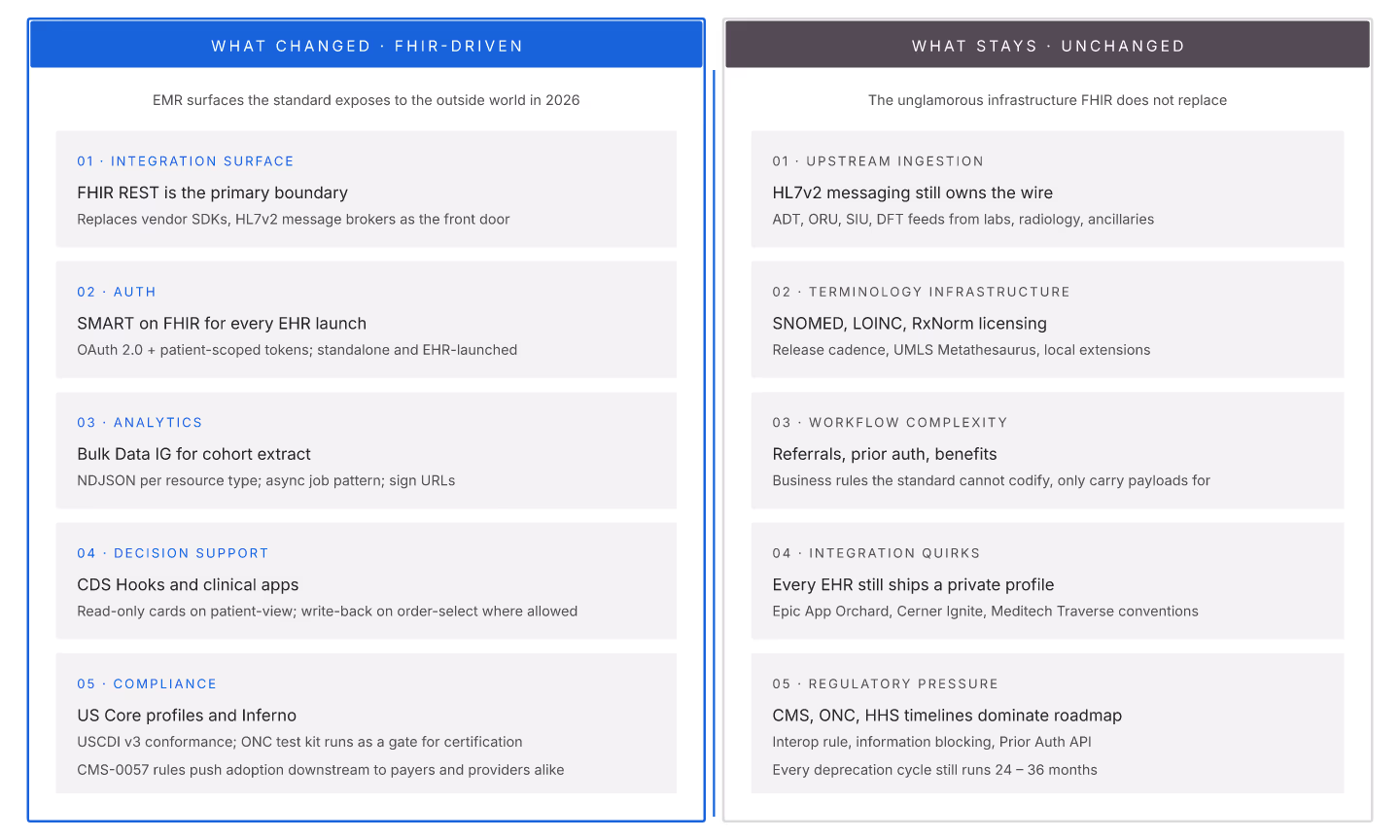
EMR development has changed materially since FHIR became mandatory but many fundamentals stay constant. Understanding both dimensions shapes 2026 development planning.
What changed (FHIR-driven)
1. Integration surface = FHIR REST. Custom APIs are legacy; FHIR REST is the ecosystem. 2. Auth = SMART. SMART on FHIR is universal. 3. Analytics = bulk data. Bulk Data IG drives warehouse pipelines. 4. Decision support = CDS Hooks. CDS Hooks fires point-of-care alerts. 5. Compliance = US Core + Inferno. US Core profiles + Inferno verification.
What stays
1. HL7v2 ingestion. Most upstream data is still HL7v2. FHIR complements, doesn't replace. 2. Terminology infrastructure. SNOMED CT, LOINC, RxNorm still dominate. 3. Workflow complexity. Care coordination, referrals, prior auth still complex. 4. Interoperability challenges. Different EHRs, different profiles, different quirks. 5. Regulatory pressure. CMS, ONC still driving requirements.
Development priorities that shifted
| Priority | 2020 | 2026 |
|---|---|---|
| Custom API design | High | Low |
| SMART launch investment | Low | High |
| Terminology server | Optional | Required |
| Bulk data support | Optional | Required |
| Custom auth | Common | Legacy |
| US Core conformance | Nice-to-have | Table stakes |
Development priorities that stayed
1. HL7v2 handling. 2. Terminology governance. 3. Data quality metrics. 4. Backup and recovery. 5. Multi-tenant isolation.
Team skills mix (mid-2026)
1. FHIR spec fluency (up from optional to required). 2. SMART auth knowledge. 3. Terminology domain understanding. 4. HL7v2 (still needed). 5. General software engineering.
EMR development in 2026 is FHIR-first but not FHIR-only. Teams that balance new FHIR skills with retained fundamentals ship better.