

Top 6 Ways to Handle Concurrent Coverage in Payer-to-Payer Exchange
Concurrent coverage is the part of CMS-0057-F Payer-to-Payer Data Exchange that breaks the simple mental model of "old payer transfers to new payer once." Many members carry two plans at the same time: Medicare with a supplement, employer plus spouse coverage, Medicare with Medicaid, or commercial plus a specialty carve-out. CMS-0057-F requires quarterly data sharing across concurrent coverage, not just once at enrollment. Six patterns have emerged for handling this complexity in 2026. For broader context, more on health plan data movement covers the surrounding architecture.
1. Quarterly Scheduled Pull Between Plans
The simplest pattern. Each plan runs a scheduled Member Match against the other plan's data each quarter, pulls any new data for shared members, and ingests it. The schedule alignment is straightforward (calendar quarters work for most plans), and the operation is predictable.
The trade-off is that data changes between quarterly pulls are not visible until the next pull. For high-volume changes (active treatment, frequent visits), the quarterly latency can be operationally meaningful.
2. Event-Driven Pull on Significant Coverage Change
A more sophisticated pattern that triggers a pull when the receiving payer notices a significant coverage event (new claim from the other plan's network, change in coverage period, change in benefit structure). The pull is targeted rather than full-history.
The pattern reduces unnecessary data movement but requires event detection logic in the receiving payer's claims system. Plans without modern event-driven claims platforms find this harder to implement.
3. Subscription-Based Notification With Pull
The pattern that emerges as TEFCA matures. Each plan subscribes to a notification channel for the other plan's significant member events. When an event occurs, the notification triggers a targeted pull. The Subscription model handles the notification layer, and the Bulk Data export handles the actual transfer.
This pattern is well-suited to FHIR Subscriptions and TEFCA-conformant networks. It is rare in mid-2026 but expected to become common as the network infrastructure matures.
4. Coordinated Plan Designation
For members with formal Coordination of Benefits arrangements (Medicare Secondary Payer rules, for example), the plans agree on primary versus secondary status and the data flow follows the agreed designation. The primary plan exports its data to the secondary on a documented cadence (usually monthly), and the secondary handles the inverse if applicable.
This pattern works well when both plans run COB processes that are already in place. For Medicare Advantage with retiree supplements, this is the default approach for many plans.
5. Member-Initiated Refresh
The pattern that puts control in the member's hands. The member can request an updated transfer at any time through the member portal, and the receiving payer fetches updated data from the prior or concurrent plan. The opt-in extends to ongoing refresh requests, not just the initial transfer.
This pattern handles edge cases that quarterly scheduling misses but adds operational load when members trigger refreshes during peak times.
6. Hybrid Concurrent and Sequential Logic
The pattern most large payers actually implement. Quarterly scheduled pulls cover the baseline. Event-driven pulls cover significant changes between scheduled cycles. Member-initiated refreshes cover individual cases. The receiving payer's ingestion layer deduplicates across the three channels.
This hybrid is the most operationally complex but the most robust for concurrent coverage cases. Plans with significant dual-eligible (Medicare-Medicaid) populations or specialty carve-out arrangements default to this hybrid because the simpler patterns leave too many edge cases.
How Concurrent Coverage Interacts With Member Match
Concurrent coverage complicates Member Match. A member with two plans has data at both, and the Match engine has to confirm identity at each plan. Plans that maintain consistent member identifiers across coverage transitions have an easier time; plans that re-issue identifiers at each coverage period create matching friction.
For the broader five-year history transfer that runs alongside concurrent coverage handling, the Best practices for 5-year history transfer covers the surrounding patterns. For the question of whether to handle these flows via TEFCA or direct API, the TEFCA vs Direct API comparison covers the transport-layer trade-offs.
Sources
Top 5 Patterns for Cerner CODE Integration with Da Vinci PAS
Cerner Oracle Health (the renamed Cerner under Oracle ownership) is the second-largest US EHR by patient volume. The Cerner Open Developer Experience (CODE) platform is the integration framework for third-party apps and CDS services. For payer-built Da Vinci PAS integrations targeting Cerner customer provider organizations, five patterns have emerged as production-grade in 2026. For broader context, more on payer-to-payer transfers covers an adjacent CMS-0057-F topic.
1. Register the CDS Service in CODE and Map to Cerner's Hook Triggers
The first practice is the foundational one. The payer's CDS service for Da Vinci CRD registers through CODE, declares which hooks it implements (order-sign, order-select, medication-prescribe), and provides the discovery URL. Cerner customer environments can then enable the service in their workflow configuration.
The CODE registration process is more lightweight than Epic App Orchard certification but still requires conformance validation. Plans submitting CDS services to CODE for the first time should budget six to ten weeks for the full registration and customer-environment enablement cycle.
2. Use Cerner's Standard SMART App Launch Patterns for DTR
Cerner supports SMART App Launch broadly. Payer-built DTR SMART apps launch through the standard SMART flow with Cerner-specific context handoff. The app receives Patient, Encounter, and the relevant clinical context for pre-population.
The pattern that works is to design the DTR app for the standard SMART App Launch sequence rather than building Cerner-specific deviation. Cerner's implementation handles the standard flow cleanly; deviations sometimes work but become per-environment configuration burdens.
3. Test the Sandbox-to-Production Transition Carefully
Cerner's sandbox environment behaves slightly differently from production customer environments. Apps that work cleanly in the sandbox sometimes encounter friction in specific customer environments because of configuration differences. The pattern is to test broadly across customer environments before declaring production-readiness, similar to the Epic recommendation but with more variance because Cerner customer customization is broader.
The practical approach is to coordinate with Cerner customer testing programs (some larger Cerner-using health systems have established programs for testing payer-built apps). Direct testing arrangements catch issues earlier.
4. Handle Cerner's PAS-Specific Submission Patterns
PAS submission from Cerner has some platform-specific behaviors. Cerner customer organizations sometimes route PAS submissions through specific Cerner middleware before they reach the payer's PAS endpoint. The middleware may modify the FHIR Bundle slightly (adding routing context, normalizing identifier formats).
Payer PAS endpoints that handle Cerner-specific Bundle variants without rejecting them avoid friction. Endpoints that strictly enforce baseline Bundle format sometimes produce unexpected rejections for Cerner-submitted Bundles.
5. Coordinate With Cerner's Behavioral Health and Specialty Workflows
Cerner has stronger market presence in certain healthcare verticals: behavioral health, specialty care, and large hospital systems. Da Vinci PAS integrations from payers serving these verticals encounter Cerner-specific workflow patterns that are less common at Epic-using customers.
Payers building broad CMS-0057-F integration should know which of their target provider populations are predominantly on Cerner and tune the integration for those workflow patterns. The integration that works perfectly for Epic-using primary care may need adjustments for Cerner-using behavioral health.
What Cerner Customers Actually Care About
Cerner customer organizations evaluating payer-built apps tend to weight three factors. First, ease of enablement: how much customer-side configuration work is needed to turn the integration on. Second, workflow fit: does the integration respect existing Cerner workflow patterns. Third, support quality: when the integration breaks, who fixes it and how quickly.
Payers that document these dimensions clearly during onboarding get faster customer adoption than payers that ship technically conformant integrations without operational documentation.
How This Fits the Broader EHR Integration Picture
Cerner integration follows similar high-level principles to Epic integration (certify early, use standard patterns, test broadly) with platform-specific variations. The patterns are not interchangeable; the work is parallel rather than identical.
For the parallel Epic-side work, the Best practices for Epic integration with payer FHIR APIs covers the Epic-specific guidance. For the broader landscape of EHR CDS Hooks support beyond Cerner and Epic, the Top 5 EHRs with strong CDS Hooks support covers the field.
Sources
Top 5 EHRs With Strong CDS Hooks Support for Da Vinci CRD
CDS Hooks is the integration pattern that lets Da Vinci CRD fire at the right point in the provider workflow. Without strong EHR support for CDS Hooks, the CRD message never reaches the clinician, and the workflow value of Coverage Requirements Discovery collapses. Five EHRs have strong CDS Hooks support in 2026, with the others ranging from partial to none. For related provider-side ePA guides, this is the practical landscape.
What "Strong CDS Hooks Support" Actually Means
A strong CDS Hooks implementation does four things. It fires hooks at the right workflow triggers (order-sign, order-select, appointment-book, medication-prescribe) consistently. It passes complete context to the CDS service (Patient, Encounter, draft order, relevant clinical data). It renders returned cards prominently in the clinician's view, not buried in a separate panel. It logs hook invocations and clinician actions for audit.
Implementations that fire hooks but pass incomplete context produce CDS responses based on guesses. Implementations that fire hooks but bury the response cards produce low clinician engagement. Both fail to deliver the intended value even though they pass technical conformance.
1. Epic
Epic has the most mature CDS Hooks implementation in the US market in 2026. The supported hooks cover the full set relevant to CRD (order-sign, order-select, medication-prescribe). Context passing is complete. Cards render in the order-entry workflow where the clinician naturally encounters them. Epic App Orchard certifies third-party CDS services for production deployment.
The certification process takes time (three to six months typically), which means payers need to start the Epic certification path well ahead of the production deadline.
2. Cerner Oracle Health
Cerner Oracle Health has strong CDS Hooks support through the Cerner Open Developer Experience (CODE) platform. The hooks fire at expected workflow triggers, context is well-formed, and the card-rendering UX is competent. CODE handles the certification for third-party CDS services through a structured but somewhat lighter process than Epic.
The implementations vary slightly across Cerner customer sites because of configuration differences. Payers building Cerner integrations test across multiple customer environments rather than relying on the sandbox alone.
3. athenahealth
athenahealth supports CDS Hooks across its athenaOne platform with growing maturity through 2025 and 2026. The implementation handles the main relevant hooks well. The third-party CDS service registration is less formalized than at Epic or Cerner, which has trade-offs: faster onboarding for payers but somewhat more variance in production behavior.
athenahealth's smaller-practice customer base makes provider engagement easier to coordinate but the total covered population per payer relationship is smaller.
4. Allscripts (Veradigm)
Allscripts (now Veradigm) supports CDS Hooks across the major Veradigm platforms. The implementation handles standard hook patterns; some advanced patterns and newer hooks are more recent additions. For payers with substantial Allscripts/Veradigm provider coverage, the platform is functional for Da Vinci CRD; for payers without significant existing Veradigm relationships, this is rarely a primary integration target.
5. eClinicalWorks
eClinicalWorks supports CDS Hooks with somewhat narrower scope than the leaders. The platform handles core hooks (order-sign in particular) but the broader hook set is less complete. eClinicalWorks has substantial market presence in independent and small-group provider settings, which makes it relevant for payers serving those provider networks even if the technical maturity lags Epic and Cerner.
The EHRs Below the Top 5
NextGen, MEDITECH, MEDHOST, Greenway Health, and others have varying CDS Hooks support that ranges from emerging to limited. For payers with provider networks heavily concentrated in these EHRs, the integration path is more uneven. Some plans build directly into specific NextGen or MEDITECH workflows rather than relying on generic CDS Hooks.
How to Plan Around Variable EHR Support
A useful planning pattern is to map the payer's provider network against EHR market share at the provider organizations and prioritize the EHR integrations by covered patient volume. A plan with 60 percent of its provider visits happening through Epic and Cerner can address most of the workflow value by certifying CDS services in those two platforms.
For Epic-specific integration patterns that go beyond the generic CDS Hooks layer, the Best practices for Epic integration with payer FHIR APIs covers the platform specifics. For Cerner-specific PAS integration patterns, the Top 5 patterns for Cerner CODE integration with Da Vinci PAS covers the related layer.
Sources

The Complete Guide to Payer-to-Payer Data Exchange for CMS-0057-F
Payer-to-Payer Data Exchange is the most technically complex of the four CMS-0057-F APIs and the one with the fewest production deployments going into 2026. The flow looks straightforward in the IG: when a member switches health plans, the receiving payer requests a five-year history from the prior payer, the member opts in, the data transfers as FHIR Bundles, and the receiving payer ingests it. In practice, every step has operational depth that surfaces during real deployment. This guide lays out what Payer-to-Payer actually requires for the 5-year history reference on this site.
What the IG Actually Requires
CMS-0057-F requires that when a member enrolls in a new health plan, the new plan must request the member's five-year clinical and claims history from the prior plan if the member opts in. The transfer happens within one business day of the formal request. The data set excludes denied PAs and cost-sharing detail. Concurrent coverage adds quarterly sharing rules. The member must be educated about the option during enrollment.
The transport layer uses FHIR Bulk Data Access for the export, FHIR Member Match for identity confirmation, and FHIR Consent for the opt-in record. The conformance bar is set by HL7 PDex IG, CARIN BB IG, and FHIR Bulk Data Access IG together.
The Member Match Problem at the Center
Member Match is the gate that determines whether the transfer happens at all. The receiving payer sends a Patient and Coverage Bundle representing the member, and the prior payer's Member Match implementation has to confirm identity. A miss returns no data. A false positive returns another patient's history, which is a privacy incident.
The honest assessment is that Member Match accuracy varies widely across vendors. Most implementations support both deterministic matching (exact identifiers, name, DOB) and probabilistic matching with confidence scoring. The threshold for what counts as a match is configurable, and the tuning has operational consequences.
For deeper coverage of matching strategies, the Top 5 Member Match strategies for Payer-to-Payer lays out the options.
The Five-Year History That Most Plans Cannot Produce Cleanly
The five-year history requirement assumes the prior payer has the data, in FHIR-compatible form, retrievable for a single member, exportable as a clean FHIR Bundle. Most US health plans have the data, but not all of those conditions. Claims data may live in X12, not FHIR. Clinical data may live in claims-attached documents that have not been parsed into FHIR resources. Five years of history may span multiple internal systems that the payer has not unified.
Plans that can produce the five-year history cleanly are the exception in 2026. Plans that cannot have to choose between producing partial history (and risking CMS audit) or investing in data integration before the transfer flow is operational.
For practical patterns that work in production, the Best practices for 5-year history transfer covers the deployments that have shipped.
The Member Opt-In Flow That Sits in the Member Portal
CMS-0057-F requires the receiving payer to capture member opt-in for the transfer. The opt-in flow typically lives in the member portal during enrollment, with educational materials explaining what data will transfer and what the member is consenting to. Payers that treat this as a checkbox tend to have low opt-in rates and weak audit trails. Payers that treat it as a designed flow have higher opt-in rates and cleaner audit positions.
The educational materials require coordination across the payer's legal, marketing, and member-experience teams. Most plans underestimate this work during vendor selection.
The Transport Question: Direct API or TEFCA
Two transport models are emerging in 2026. The direct API model has receiving and prior payers running paired FHIR endpoints with point-to-point authentication. The TEFCA model uses a Qualified Health Information Network (QHIN) as the intermediary, with each payer connecting to TEFCA rather than to each other directly.
The direct API model gives payers more control. The TEFCA model reduces per-payer engagement work substantially.
For the deeper comparison, the TEFCA vs Direct API for Payer-to-Payer transfer covers which fits where. Most large-scale 2026 deployments are choosing a hybrid: TEFCA for the network discovery and authentication, direct API for the actual data transfer.
Sources

Standalone SMART vs EHR Launch for Da Vinci DTR Workflows
SMART App Launch defines two launch patterns. Standalone Launch starts the app outside any EHR context, typically from a web link. The user authenticates, picks a patient, and the app runs. EHR Launch starts the app from within the EHR, with the EHR providing Patient, Encounter, and other context. For Da Vinci DTR workflows, both patterns are technically conformant. The choice has substantial consequences for clinician adoption and the experience of completing a PA inside the provider workflow. This comparison lays out the trade-offs for the inter-payer transfer reference on this site.
What Each Launch Pattern Actually Does
Standalone Launch is essentially a web-app pattern. The user navigates to the DTR app URL (often from a CRD card with a launch link, or directly from a bookmark). The app prompts for authentication, the user logs in with payer-issued credentials, the app prompts the user to identify the patient, and the user then completes the questionnaire. The app runs in its own browser tab or window separate from the EHR.
EHR Launch starts the app inside the EHR. The EHR provides authentication tokens via SMART OAuth, passes Patient and Encounter context, and embeds the app in an EHR-controlled view. The clinician sees the DTR form without leaving the patient chart and the app already knows which patient is being treated.
Where EHR Launch Wins
EHR Launch wins on clinician experience. The clinician does not authenticate separately, does not pick the patient (the EHR already knows), does not switch context to a separate window, and sees the DTR form as part of the clinical workflow. Pre-population from EHR context works because the context is already provided.
EHR Launch also wins on adoption. Workflow integration that respects the clinician's existing pattern gets used. Workflow integration that requires context-switching gets bypassed in favor of legacy submission channels (phone, fax) regardless of how technically capable the DTR app is.
Where Standalone Launch Wins
Standalone Launch wins in narrow circumstances. Care management staff who handle PAs outside the clinician's direct workflow can use a standalone DTR app. Specialty providers whose EHR does not support SMART EHR Launch (or supports it poorly) can use standalone as a fallback. Initial pilot rollouts before the EHR-specific work is complete can use standalone for testing.
Standalone Launch is also the only path when the workflow originator is not in an EHR. For example, an automated batch submission tool processing accumulated PA requests overnight does not have an EHR launch context; it operates standalone.
The Adoption Gap That Matters Operationally
The data from production DTR deployments in 2025 and early 2026 shows a wide adoption gap. EHR-launched DTR apps see provider completion rates of 60 to 85 percent (depending on workflow design and EHR-specific quirks). Standalone-launched DTR apps see completion rates of 20 to 40 percent for clinician-facing cases, with the rest falling back to legacy submission.
The gap is not about technical quality. It is about whether the workflow asks the clinician to do additional work (find the standalone link, authenticate, pick the patient) or fits into work the clinician is already doing.
When Standalone is Actually the Right Choice
For care-management workflows (not clinician-facing), standalone is sometimes the right pattern. The care management team is processing PAs as their primary work; the standalone DTR app is the right tool for that work. They do not need EHR launch context because they are not embedded in EHR workflow.
For batch-style PA processing where multiple submissions are completed in sequence outside any single clinical encounter, standalone fits the work pattern better than EHR Launch (which would require launching from a specific patient context for each PA).
The Hybrid Pattern That Works Best in Production
Most production DTR deployments support both launch patterns. EHR Launch handles the clinician-facing case where it is supported by the target EHR. Standalone Launch handles care-management workflow, EHR-without-SMART-support fallback, and edge cases. The DTR app code is mostly shared; the difference is in the launch sequence.
For the broader catalog of DTR SMART app design patterns that work well in production, the Best DTR SMART app patterns for provider workflows covers the field-tested designs. For the broader workflow anti-patterns to avoid, the 5 EHR workflow anti-patterns that break Da Vinci PA adoption covers the failure modes.
Sources

CDS Hooks vs FHIR Subscriptions for EHR-Payer Notification
When a payer needs to notify an EHR of an event (PA decision rendered, member transferred, eligibility changed), two FHIR-native mechanisms apply. CDS Hooks is a workflow-triggered pattern: the EHR calls the payer service at a specific decision point, and the payer responds with information. FHIR Subscriptions is an event-driven pattern: the EHR registers interest in resource changes, and the payer pushes notifications when events happen. Both are conformant; the choice has operational consequences. This comparison lays out the trade-offs for more on payer-side workflow integration on this site.
What Each Pattern Does
CDS Hooks is a request-response pattern. The EHR initiates contact at a defined workflow trigger (order-sign, order-select, appointment-book, medication-prescribe). The payer service receives the call, processes the context, and returns a card with information. The EHR renders the card inline in the workflow. The flow is bounded by the trigger; nothing happens between triggers.
FHIR Subscriptions is a publish-subscribe pattern. The EHR or another consumer registers a Subscription with the payer's FHIR server, specifying which resource changes to be notified about. The payer pushes notifications when matching changes occur. The flow is continuous; events propagate as they happen.
Where CDS Hooks Wins
CDS Hooks wins for clinician-facing in-workflow notification. The EHR has the workflow context; the hook fires at the right moment; the response renders inside the workflow the clinician is already using. For PA pre-checks at order entry, this is the right pattern.
CDS Hooks also wins when the notification is action-driven. The clinician is making a decision; the payer's information needs to arrive at the moment of the decision. Notifications that arrive between decisions are less useful in clinician workflows.
Where FHIR Subscriptions Wins
FHIR Subscriptions wins for status-change notifications that happen outside the clinician's current workflow. A PA decision rendered by the payer's UM team three hours after submission is a status change; CDS Hooks cannot push this back because the EHR is not actively asking. Subscriptions can push.
Subscriptions also win for back-office and care-management workflows where the consumer is not the clinician at the moment of decision. A care management team monitoring a population for PA outcomes wants Subscription-style notification rather than relying on clinician-triggered hooks.
The Patterns Combine
In production, most CMS-0057-F EHR-payer integrations use both patterns together. CDS Hooks handles the initial CRD prompt at order-sign. The clinician launches DTR, completes the form, submits PAS. The PA submission creates a Task that the payer's UM system processes. When the UM system renders the decision, a FHIR Subscription fires that notifies the EHR. The EHR consumes the notification and updates the relevant view (the patient's chart, the order status, the clinician's task list).
This combined flow uses CDS Hooks for the synchronous decision support and Subscriptions for the asynchronous status update. Neither pattern alone covers the full lifecycle.
The EHR Support Asymmetry
EHR support for CDS Hooks is broader and more mature than support for FHIR Subscriptions in 2026. Epic, Cerner Oracle Health, and athenahealth all support CDS Hooks well. FHIR Subscriptions support is patchier; Epic and Cerner have working implementations but smaller EHRs may not.
This asymmetry means CDS Hooks works as a baseline integration pattern across more EHRs, while Subscriptions works only where the EHR supports it. For payers whose provider network spans many EHRs, the practical pattern is CDS Hooks for the synchronous layer and Subscriptions where possible plus polling-based fallback where it is not.
The Performance and Reliability Differences
CDS Hooks calls are synchronous, which means latency and error handling matter at the moment of the clinician's workflow. A slow or unreliable hook degrades the workflow experience. Subscriptions are asynchronous, which means latency matters less but reliable delivery matters more. A dropped Subscription notification means the consumer never knows the event happened.
Production implementations handle both: CDS Hooks with strict latency SLAs and retries on transient failures, Subscriptions with delivery guarantees and consumer-side reconciliation.
How to Read Vendor Positioning
For the CDS Hooks side of EHR support specifically, the Top 5 EHRs with strong CDS Hooks support for Da Vinci CRD covers the EHR-side landscape. For the broader Patient Access API integration patterns that may use Subscriptions for status changes, the Top 5 EHR integration patterns for Patient Access API consumers covers the related layer.
Sources

Best Practices for 5-Year History Transfer Under CMS-0057-F
The five-year history transfer is the data-heaviest part of Payer-to-Payer Data Exchange. The CMS-0057-F requirement assumes the prior payer can produce five years of clinical and claims data for a single member, package it as a clean FHIR Bundle, and deliver it within one business day of the formal request. Plans that have not invested in data integration ahead of time often discover they cannot meet this bar without significant effort. Here are best practices for the inter-payer transfer reference on this site.
1. Inventory Five Years of Data Before You Need It
The first practice is the simplest and most often skipped. Build an inventory of where five years of data actually lives for a randomly selected member. Claims data is usually in the claims platform but may have been archived. Clinical data may live in claims-attached documents, in HIE feeds, in care management systems, or in CDA documents that have not been parsed into FHIR.
Plans that do this inventory before the first transfer request discover the gaps in time to address them. Plans that wait discover gaps under deadline pressure.
2. Build the FHIR Conversion Layer as Part of CMS-9115-F Work
For payers running CMS-9115-F since 2021, the Patient Access API already required some claims-to-FHIR conversion. Plans that extended this conversion to cover the broader CARIN BB profiles, PDex profiles, and the Bulk Data export pattern have a head start on Payer-to-Payer.
Plans that built the CMS-9115-F Patient Access conversion narrowly (just enough for the API) typically need additional work to support the five-year history scope.
3. Exclude Denied PAs and Cost-Sharing Detail Explicitly
The IG specifically excludes denied PAs and cost-sharing detail from the transfer. Implementations that pull broadly and filter at the end risk leaking excluded data. Implementations that scope the query to include only the required data at retrieval time produce cleaner output and audit cleanly.
The exclusion logic is straightforward in the IG but requires deliberate implementation. Plans that treat it as a post-processing filter sometimes find edge cases where excluded data leaks.
4. Handle the One-Business-Day Window With Async Processing
The one-business-day window from request to data delivery is realistic when the export pattern is async. Implementations that try to deliver synchronously often miss the window when the history is large or the data layer is slow.
The standard pattern uses FHIR Bulk Data async export: the receiving payer requests the export, gets a job identifier, and polls or subscribes for completion. The data is delivered as NDJSON file URLs once the export completes. Most plans target completion in 4 to 12 hours, which leaves margin against the one-business-day window.
5. Sequence the Bundle by Resource Type for Consumer Efficiency
The five-year history is delivered as multiple FHIR Bundles, typically chunked by resource type or by date range. Consumer-side ingestion is much smoother when the Bundles arrive in an order that lets the receiving payer process foundational resources first (Patient, Coverage, Practitioner) before consuming the larger clinical resources (Observation, Condition, Procedure).
Implementations that sequence Bundles thoughtfully reduce consumer-side complications. Implementations that emit Bundles in arbitrary order force the consumer to handle deferred resolution and re-processing.
6. Test Against Realistic Member Profiles
A useful pre-production test is to run the full five-year history export for a synthetic member with realistic data volume (200,000 to 500,000 resources is typical for a member with chronic conditions and active care). The export time, output integrity, and consumer-side ingestion all surface issues at this scale that small test profiles miss.
How This Fits the Broader Payer-to-Payer Architecture
The five-year history transfer is the data-heaviest step in a flow that also includes Member Match, Consent, and concurrent coverage handling. The pieces have to work together cleanly; a fast history export paired with a slow Consent flow does not actually deliver the data on time.
For the concurrent coverage handling that often complicates the transfer, the Top 6 ways to handle concurrent coverage in Payer-to-Payer exchange covers the patterns. For the member-facing opt-in flow that triggers the transfer, the 5 educational material patterns for Payer-to-Payer member opt-in covers the consent side.
Sources

5 EHR Workflow Anti-Patterns That Break Da Vinci PA Adoption
Da Vinci PA adoption inside provider organizations depends on workflow fit. Technical conformance with CMS-0057-F is necessary but not sufficient; provider organizations that find the workflow awkward fall back to legacy PA channels (phone, fax, web portal) regardless of how technically capable the FHIR ePA stack is. Five anti-patterns consistently break adoption in 2026 deployments. For more on TEFCA and CMS interop coverage, these are the failure modes worth knowing.
1. Forcing Standalone SMART Launch When EHR Launch Is Available
The most common anti-pattern. The payer's DTR SMART app is built to launch standalone (from a payer portal link), even when the target EHR supports SMART EHR Launch cleanly. The clinician has to switch context to a separate window, authenticate, find the patient, and complete the form outside the clinical workflow.
Provider adoption of standalone DTR is consistently low. Clinicians who can submit through legacy channels in two minutes prefer those over a standalone DTR that takes five minutes plus context switching. The fix is to support EHR Launch wherever the target EHR allows.
2. Requiring Manual Data Entry for Fields Available in EHR Context
A pattern where the DTR app launches inside the EHR but does not pre-populate available fields. The clinician sees a blank questionnaire and manually re-enters patient demographics, current medications, recent diagnoses, and other data the EHR already has.
This anti-pattern wastes clinician time and undermines the entire premise of EHR-embedded PA. The fix is to wire up FHIR pre-population from the EHR context (Patient, Encounter, MedicationStatement, Condition) so the clinician sees a partially-completed form.
3. Showing All Questions Regardless of Relevance
A pattern where the DTR app displays the full questionnaire (which can be 30 or more questions) without using CQL conditional logic to hide irrelevant questions. The clinician scrolls through dozens of inapplicable questions to find the few that actually apply to the case.
This anti-pattern is especially bad on mobile-EHR clients where scrolling is more friction. The fix is to author CQL rules that drive conditional question rendering based on prior answers, the patient's current state, and the specific PA case.
4. Synchronous-Only Submission With No Save State
A pattern where the DTR app requires the clinician to complete the questionnaire in one session, with no save-and-resume capability. PA forms sometimes need supporting data (a pending lab result, an imaging review not yet completed) that the clinician cannot answer at the moment.
When the form has no save state, the clinician either has to abandon the workflow and restart later (losing all progress) or wait until everything is available and complete in one sitting (which disrupts the clinical flow). The fix is to support partial save, hand-off between clinical staff, and resume across sessions.
5. Burying the PA Decision in a Notification That Does Not Surface in Clinical Workflow
A pattern where the PA decision comes back from the payer (after the UM team reviews it) but the notification is sent to a payer-controlled portal or an email address rather than into the provider's EHR workflow. The clinician does not learn the decision until the next encounter with the patient or until staff manually check the portal.
The CMS-0057-F intent is that PA decisions integrate with the provider workflow. The fix is to use FHIR Subscriptions to notify the EHR of decision changes, with the EHR rendering the notification in a place the clinician naturally encounters (the patient chart, the order status, a task list).
How These Anti-Patterns Compound
The anti-patterns are not independent. A DTR app that uses standalone launch (Anti-Pattern 1) typically also lacks EHR context for pre-population (Anti-Pattern 2). A form without conditional logic (Anti-Pattern 3) combined with no save state (Anti-Pattern 4) produces a workflow that almost no clinician completes. Production deployments need to address the anti-patterns together rather than fixing one at a time.
For positive patterns to use instead, the Best DTR SMART app patterns for provider workflows covers the production-grade designs. For the architectural choice between standalone and EHR launch specifically, the Standalone SMART vs EHR Launch for Da Vinci DTR workflows comparison covers the trade-off.
Sources

Terminology Server Value: What It Actually Delivers
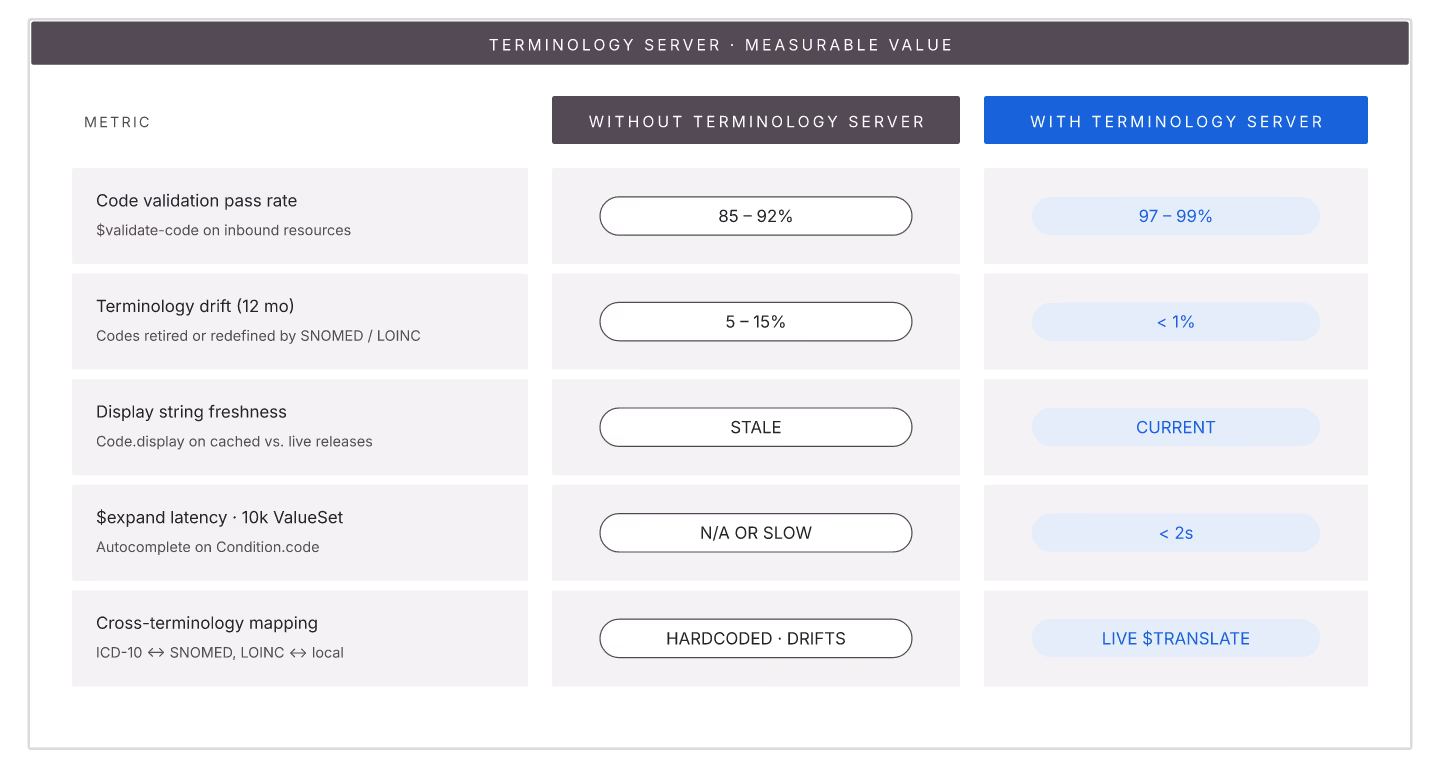
Terminology servers seem like infrastructure most teams could skip. In practice they deliver measurable value that shapes data quality significantly.
Value 1: $validate-code on write. Every coded field validated at write time. Prevents bad codes from landing in the FHIR store. Sites without this see 5-15% terminology drift within 12 months.
Value 2: $expand for choice-list population. SDC forms populate dropdown choices via ValueSet expansion. Runtime $expand on 10k+ concept ValueSets requires terminology server.
Value 3: $translate for cross-terminology mapping. ICD-10 to SNOMED, LOINC-to-SNOMED, RxNorm-to-NDC. Application code that embeds mappings drifts; terminology-server-driven $translate stays current.
Value 4: $lookup for display resolution. Codes have display strings that update; terminology server provides current display. Prevents stale strings in application UI.
Value 5: Cross-system terminology consistency. Multiple FHIR servers share one terminology server; all bindings consistent.
Measurable data quality impact
| Metric | Without terminology server | With |
|---|---|---|
| Code validation pass rate | 85-92% | 97-99% |
| Terminology drift over 12 months | 5-15% | <1% |
| Cross-system consistency | Low | High |
| Downstream reporting accuracy | Poor | Good |
Deployment options
1. In-process with FHIR server. HAPI's terminology module, Aidbox terminology. Simpler ops. 2. Standalone. Ontoserver. More capable, more infra. 3. Managed cloud. Fewer options; typically fewer features.
Cost justification
Sites without terminology servers spend the equivalent budget on downstream data cleanup, analytics correction, and compliance remediation. Net cost is often higher without than with.
Terminology servers deliver quiet value. Investment upfront pays back through avoided debt for years.

FHIR Implementation Steps: A 90-Day Getting Started Roadmap
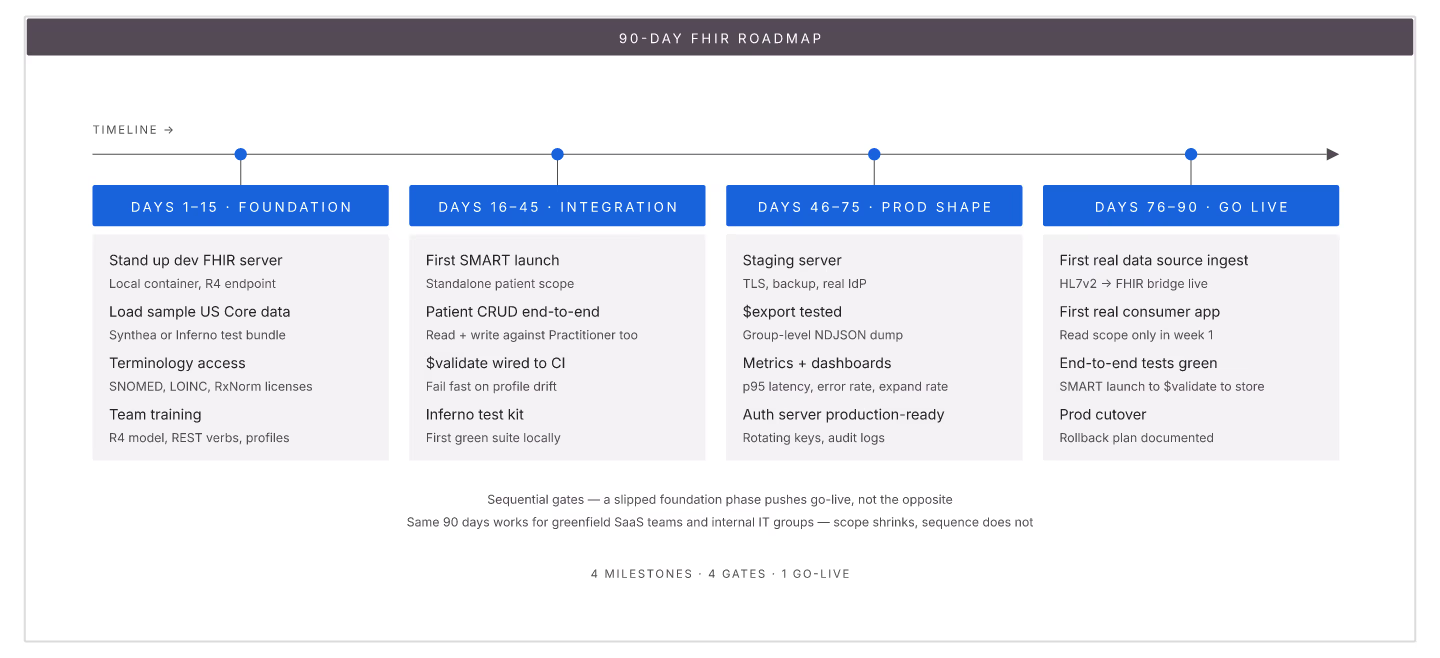
FHIR implementation for teams starting from zero involves specific 90-day milestones. Following the sequence below prevents scope explosion and ships something usable by day 90.
Days 1-15: Foundation
1. Deploy dev FHIR server (HAPI, Aidbox, or Medplum) locally. 2. Load sample US Core-conformant Patient, Observation, Encounter resources. 3. Set up terminology server access (Ontoserver dev, or in-process). 4. Team FHIR training (spec walkthrough + selected server tutorials).
Days 16-45: Basic integration
1. First SMART launch (patient standalone) working against dev server. 2. Basic Patient read/write endpoints working. 3. $validate wired into write path. 4. Inferno test setup for US Core.
Days 46-75: Production-shape features
1. Deploy staging FHIR server (production-like config). 2. Bulk export capability ($export operation). 3. Prometheus metrics + dashboards. 4. Auth server (Keycloak, Auth0, or built-in).
Days 76-90: Real integration
1. First real data source ingesting (HL7v2 converter or direct FHIR). 2. First real consumer (SMART app or bulk pipeline). 3. End-to-end conformance test passing. 4. Runbook for operations.
Timeline risks
| Risk | Impact |
|---|---|
| No dedicated team | +3-6 months |
| No FHIR expertise on team | +3 months |
| Legacy data migration in scope | +6-12 months |
| Custom auth requirement | +3 months |
What NOT to try in first 90 days
1. CMS-0057 conformance (defer to months 4-9). 2. Multi-EHR integration (start with one). 3. Da Vinci profiles (US Core first). 4. Bulk data optimization (baseline first). 5. Complex SDC forms.
Success signals at day 90
1. FHIR server in staging with real data. 2. First integration end-to-end working. 3. Inferno tests passing. 4. Team fluent in FHIR concepts. 5. Runbook exists.
The 90-day roadmap works for teams starting with focused execution and clear scope. Extend timelines proportionally for team ramp-up needs.