

Top 6 FHIR Group Resource Patterns for Provider Panel Management
The FHIR Group resource is how provider panels get expressed in Provider Access. Each in-network provider has one or more Group resources listing the members attributed to them, and the group-level Bulk Data export operates against these Groups. The Group resource is conceptually simple but the patterns for managing it vary substantially across implementations. Six patterns have emerged in 2026 production deployments. For more on FHIR attribution patterns on this site, these are the practical patterns.
1. Materialized Group With Scheduled Rebuild
The most common pattern. The Group resource is materialized in the FHIR store, with member references explicitly listed. A scheduled job rebuilds the Group at a defined cadence (typically nightly or weekly) from the underlying attribution data.
The pattern is operationally simple. The Group is a static resource the rest of the system can query like any other FHIR resource. The trade-off is the rebuild cadence: changes to attribution between rebuilds are not reflected, which can produce slightly stale panels for Provider Access requests.
2. Virtual Group With On-Demand Resolution
A pattern where the Group is virtual: the FHIR API exposes Group resources but resolves the membership list at query time from the attribution database. The Group does not exist as stored data; it is computed on demand.
The pattern produces always-fresh attribution. The trade-off is the query-time cost: each Group access triggers an attribution lookup, which can be slow for large panels.
3. Hierarchical Group With Sub-Groups
A pattern for handling provider organization hierarchies. A health system has Groups at the organization level, the specialty level, and the individual provider level. Sub-groups roll up to parent groups. Provider Access requests can query at any level of the hierarchy.
The pattern fits provider organizations with multi-level structure (an academic medical center with departments, divisions, and individual physicians). The implementation complexity is in maintaining the hierarchy consistently as the organization changes.
4. Multi-Attribution Group With Scope Tagging
A pattern that handles members with multiple attributions (PCP plus specialist). The Group resource includes the member with a scope tag (extension) indicating which attribution applies. Provider Access requests can filter by scope tag to get attribution-specific Group membership.
The pattern handles specialty carve-outs cleanly. The implementation requires the FHIR Group resource to support the scope tagging, which means using extensions consistently.
5. Time-Bounded Group With Effective Dates
A pattern where Group membership has effective start and end dates. A member who joined a PCP's panel in March is recorded with that start date; a member who left in August is recorded with that end date. The Group reflects the current effective membership at query time.
The pattern handles attribution changes over time defensibly. Historical Provider Access requests can reconstruct who was attributed when. The implementation complexity is in maintaining the effective dates and pruning expired records.
6. Hybrid Materialized Plus Live Lookup
A pattern that combines materialized Group resources for performance with live lookup for currency. Most queries hit the materialized Group (fast). Specific high-importance queries (PA decisions, recent attribution changes) trigger a live lookup against the attribution database.
The pattern fits production deployments at scale. The materialized layer handles the typical query load; the live lookup handles the cases where freshness matters more than performance.
How the Group Resource Patterns Interact With Bulk Data Export
The pattern choice affects how group-level Bulk Data export performs. Materialized Groups produce fast exports because the member list is already resolved. Virtual Groups produce slower exports because the member list has to be resolved before the export can start. Time-bounded Groups need export-time filtering for the relevant effective date.
For typical CMS-0057-F production deployments, the materialized pattern with scheduled rebuild is the default starting point. Plans with high attribution churn or specialty carve-outs extend toward the hierarchical, multi-attribution, or hybrid patterns.
What the FHIR Group Spec Allows and What It Implies
The FHIR R4 Group resource is flexible: it allows actual or descriptive membership, characteristic-based filtering, and various member identifier patterns. Production implementations need to pick a specific pattern and apply it consistently. The spec does not enforce a single pattern, which means cross-implementation interoperability depends on documented conventions.
For the broader question of which attribution methodology drives the Group contents, the Best attribution-of-record patterns for CMS-0057-F Provider Access covers the methodological choices. For the export-side performance that Group resource design affects, the Top 5 Async Export patterns for FHIR Bulk Data implementations covers the export layer.
Sources

Top 5 Member Opt-In Flows for CMS-0057-F Payer-to-Payer
Member opt-in for Payer-to-Payer Data Exchange is the user-facing layer where the technical infrastructure meets actual members. CMS-0057-F requires the receiving payer to capture explicit opt-in for the transfer, along with educational materials explaining what data will move. The design of this flow determines opt-in rates, audit defensibility, and member satisfaction. Five patterns have emerged across 2026 deployments, each with different operational characteristics. For broader context, more on TEFCA and CMS interop covers the surrounding regulatory layer.
1. Enrollment-Time Opt-In Inside Member Application
The most common pattern. During the member's plan enrollment application, a section explains Payer-to-Payer transfer and offers opt-in. The member checks a box, signs electronically, and the consent is captured in the application record.
This pattern catches the highest opt-in rate because the member is already engaged in onboarding. The educational content is short, the friction is low, and the consent record is part of the formal enrollment package. The trade-off is that members who skip the optional section default to no transfer, which means clean documentation but lost transfer opportunity.
2. Welcome Sequence Opt-In Through Member Portal
A pattern where opt-in arrives during the post-enrollment welcome sequence. The new member receives a welcome message that includes a link to the Payer-to-Payer opt-in flow, and the flow lives in the member portal with longer educational content and richer interaction.
This pattern catches members who skipped the enrollment-time opt-in and provides more educational depth. The opt-in rate is typically lower than enrollment-time but higher than later-stage prompts. The trade-off is the timing window; members who delay engagement may not opt in before clinical needs arise.
3. Triggered Opt-In on First Clinical Event
A pattern where the system detects when the member has a clinical event (first appointment, first claim, first prescription) and triggers an opt-in request with the context "we noticed you have a new appointment, would you like us to retrieve your history from your prior plan."
The pattern catches members at moments of clinical relevance, when the transfer's value is most concrete. Opt-in rates at this stage are higher than passive welcome flows because the member sees the immediate benefit. The trade-off is the implementation complexity; the trigger logic has to work across claims, scheduling, and pharmacy systems.
4. Mobile App In-Context Opt-In
A pattern that lives in the payer's mobile app, with the opt-in presented as a one-tap card alongside other onboarding tasks. The mobile context allows for biometric authentication, which produces a stronger consent record than browser-based checkboxes.
This pattern works best for plans with strong mobile app adoption. For plans whose members primarily engage via web or call center, the mobile flow misses substantial population.
5. Call-Center-Mediated Opt-In
A pattern where the call center handles opt-in during member service calls. The agent explains the option verbally, captures opt-in through the agent's interface, and the consent is recorded in the system.
This pattern is the lowest-tech but highest-engagement for populations that prefer phone interaction over digital. Senior populations and members with limited digital access benefit. The operational cost is real: agents need training, the consent capture has to be documented for audit, and call handle times extend slightly.
How to Pick the Flow Mix
Most production deployments run a combination. Enrollment-time is the baseline because it catches the easy cases. Welcome-sequence picks up the second-chance population. Triggered opt-in handles the engagement gap. Mobile in-context is layered on top for plans with strong mobile adoption. Call-center mediation handles edge cases.
The numbers vary by population. Plans with younger, digitally engaged members get most opt-ins from enrollment-time and mobile. Plans with older or less digital populations rely more on welcome-sequence and call-center patterns.
For the educational content that supports each flow, the 5 Educational material patterns for Payer-to-Payer member opt-in covers the content design. For the technical FHIR Consent capture underneath the user-facing flow, the Top 5 FHIR Consent patterns for Payer-to-Payer covers the data layer.
Sources

Top 5 EHR Integration Patterns for Patient Access API Consumers
When a payer's Patient Access API exposes member data, the consumers fall into three categories. Members using third-party apps (the original CMS-9115-F use case). Other payers receiving data under Payer-to-Payer Data Exchange. Providers' EHRs consuming the member's shared history. The EHR-side consumption is the integration most often underestimated, because Patient Access is usually discussed as a member-facing feature. Five integration patterns have emerged for EHRs consuming Patient Access in 2026. For the EHR-payer integration hub on this site, these are the practical paths.
1. Member-Initiated Pull Through SMART App Launch
The pattern that fits CMS-0057-F naturally. The member shares their Patient Access credentials or authorizes a SMART app inside the provider's EHR to pull their prior payer history. The EHR launches the SMART app, the app calls the prior payer's Patient Access API, and the data flows into the EHR's clinical view.
The pattern preserves member consent (the member initiates the share) and works with existing SMART App Launch infrastructure most major EHRs already support. The trade-off is the member friction; some members skip the share, leaving the EHR without the prior history.
2. Standing Authorization for Network Plans
A pattern that emerges in narrow-network plans where the EHR has standing authorization to query the payer's Patient Access API for any member of the plan. The pattern works when the member's enrollment in the plan implicitly authorizes the EHR-payer data exchange for clinical purposes.
The legal and consent framework for this is delicate; not all plans support it, and member-rights considerations vary by state. Where it works, the friction reduction for providers is significant.
3. EHR-Mediated Member Verification With Pull
A pattern that splits the share into two steps. The provider's EHR collects member verification (insurance card, member ID, demographic data) at intake. The EHR uses this verification to call the prior payer's Patient Access API, with member acknowledgment captured at the intake desk rather than through a separate SMART app launch.
The pattern works for providers with structured intake processes. It pushes some of the authentication complexity to the EHR's intake workflow rather than asking the member to launch a separate app.
4. Care-Coordination Pull Through Provider Access API
A pattern that uses the Provider Access API (rather than Patient Access) for the EHR-side pull. When the EHR is consuming data for a provider who is in-network with the payer, the Provider Access API is the appropriate channel and does not require per-request member consent.
The pattern fits provider organizations whose EHRs handle in-network member care. The complexity shifts to attribution: the Provider Access API requires the payer to know which members the requesting provider is attributed to.
5. Hybrid Pattern Combining Multiple Access Methods
A pattern that combines all of the above into one cohesive EHR workflow. Member-initiated share covers easy cases. Standing authorization covers narrow-network in-plan situations. Provider Access covers attribution-aware in-network cases. The EHR's data layer normalizes data from all sources into the clinical view.
This hybrid is operationally complex but provides the most complete data picture. Larger EHR deployments and integrated health systems with substantial payer-provider relationships tend toward this pattern.
How to Pick the Pattern for Your Provider Network
The pattern choice depends on the provider's relationship with the payer, the EHR's technical capability, and the member-experience priorities. Provider organizations with narrow-network relationships and integrated payer infrastructure use Patterns 2 and 4. Provider organizations with diverse payer relationships use Pattern 1 (Member-Initiated). Highly integrated health systems use the hybrid.
The patterns are not mutually exclusive. A typical health system uses Pattern 1 for out-of-network member care, Pattern 4 for in-network attributed members, and falls back to Pattern 3 for ambiguous cases.
For the synchronous notification side of EHR-payer interaction that complements these pull patterns, the CDS Hooks vs FHIR Subscriptions comparison covers the notification layer. For Epic-specific integration patterns within these flows, the Best practices for Epic integration with payer FHIR APIs covers the platform-specific guidance.
Sources

The Complete Guide to FHIR Bulk Data and Attribution for CMS-0057-F
FHIR Bulk Data Access is the transport layer underneath two of the four CMS-0057-F APIs. Provider Access uses it to deliver in-network provider panels. Payer-to-Payer Data Exchange uses it to transfer five-year member histories. The Bulk Data spec is conceptually simple: an async export that produces NDJSON files containing FHIR resources, with a manifest listing the files and a content-location header for polling. The implementation reality is far more complex than the spec suggests. This guide lays out what production-grade Bulk Data and attribution actually require for deeper Bulk Data engineering coverage on this site.
What FHIR Bulk Data Access Actually Does
A FHIR Bulk Data export starts with a request to the server's $export operation (system-level, group-level, or patient-level depending on scope). The server returns a 202 Accepted with a Content-Location header pointing to the status endpoint. The client polls the status endpoint until the export completes. The completed response is a manifest listing the NDJSON file URLs, each containing the exported FHIR resources of a specific type.
The pattern is async on purpose. Exports for realistic CMS-0057-F workloads (a 100,000-member provider panel, a 500,000-resource member history) cannot complete synchronously within HTTP timeout windows.
The Attribution Problem at the Center of Provider Access
Provider Access uses group-level Bulk Data export, where the Group resource represents a provider's attributed member panel. The server has to know which members are attributed to which provider, and the attribution model has to be exposed through the Group resource.
Most US payers have multiple attribution methodologies running in parallel: geographic (PCP nearest to the member's address), claims-based (PCP the member uses most), panel-assigned (member chose the PCP at enrollment), capitated (member is paying a capitated arrangement to a specific provider group). Production-grade Bulk Data implementations expose attribution as configurable rather than hard-coded.
For deeper coverage of the attribution patterns, the Best attribution-of-record patterns for CMS-0057-F Provider Access covers the field.
The NDJSON Output That Makes or Breaks the Consumer Experience
The export delivers data as NDJSON: newline-delimited JSON, one FHIR resource per line, files grouped by resource type. NDJSON makes streaming consumption efficient because the consumer can process line by line without loading the entire file.
The format is simple but the implementation has variability. Some exporters chunk files at fixed byte boundaries. Some chunk at resource-count boundaries. Some produce one massive file per resource type. The chunking strategy affects consumer-side memory usage, parallelism, and download resumability.
For the format-level comparison of NDJSON streaming versus batched JSON approaches, the NDJSON Streaming vs Batched JSON for FHIR Bulk Exports comparison covers the trade-offs.
The Performance Bar That Defines "Production-Grade"
A useful performance benchmark for CMS-0057-F-grade Bulk Data is: a 100,000-member group-level export with five years of history per member should complete in under 30 minutes and produce clean NDJSON output that consumers can ingest without error.
Implementations that miss this bar are not yet production-ready for the volume CMS-0057-F is going to drive after January 2027. Implementations that hit it cleanly typically have invested in async export tooling, parallel resource serialization, and snapshot consistency.
For the specific optimizations that make this performance achievable, the Top 5 Bulk Data export optimizations for Provider Access at scale covers the engineering patterns.
The Consumer-Side Pieces That Most Documentation Ignores
The exporter is half the story. The consumer (typically an EHR consuming Provider Access, another payer consuming Payer-to-Payer) has to fetch the NDJSON files, parse them, deduplicate against existing data, and integrate the resources into their data model. Consumer-side performance under realistic load is its own engineering problem, distinct from the exporter side.
Consumer-side issues that surface in production: NDJSON parsing errors on edge cases, memory pressure from large files, slow ingestion that bottlenecks the data pipeline, and reconciliation problems when the same resource arrives in multiple Bulk Data deliveries over time.
How This All Fits the CMS-0057-F Picture
Bulk Data is the technical foundation under two of the four CMS-0057-F APIs. Provider Access and Payer-to-Payer both depend on it being fast, reliable, and correct. The attribution layer determines who can request what data. The NDJSON output determines whether consumers can actually use the data efficiently.
Plans that invest in production-grade Bulk Data infrastructure ahead of the deadline avoid most of the surprises that catch other plans during the post-2027 traffic ramp. Plans that treat Bulk Data as a checkbox often discover the gaps when the volume arrives.
Sources

NDJSON Streaming vs Batched JSON for FHIR Bulk Exports
The FHIR Bulk Data IG specifies NDJSON as the output format, but the implementation patterns vary. Pure NDJSON streaming produces a continuous newline-delimited file of resources. Batched JSON wraps batches of resources in JSON arrays, which is technically not NDJSON but appears in some implementations as a deviation. Each approach has consequences for consumer-side performance, memory usage, and error handling. For deeper Bulk Data engineering coverage on this site, this is the format-level decision.
What Each Format Actually Looks Like
NDJSON is a sequence of FHIR resources, one per line, each line being a complete JSON object representing one resource. There are no array brackets, no commas between resources, and no top-level object wrapping the file. A consumer reads one line at a time, parses it as JSON, and processes the resource.
Batched JSON wraps groups of resources in JSON arrays. A file might contain a top-level array of 1000 resources, then another array of 1000 resources, then another. Some implementations use one big array per file. Some use chunked arrays separated by newlines (which is closer to NDJSON but with each line being an array rather than a single resource).
Why NDJSON Wins For Streaming Consumption
NDJSON allows true streaming consumption. The consumer can process resources one at a time, in constant memory regardless of file size. A 10 GB NDJSON file processes in the same memory footprint as a 1 MB NDJSON file because the consumer only holds one resource at a time.
Batched JSON requires the consumer to either load entire batches into memory (which scales poorly for large files) or implement a custom streaming JSON parser (which is harder than line-based NDJSON parsing).
For CMS-0057-F workloads where Bulk Data files routinely run hundreds of MB to several GB, NDJSON's memory efficiency matters substantially.
Why Some Implementations Use Batched JSON Anyway
Batched JSON appears in implementations that were not built for streaming consumption from the start. Existing tooling that produces standard JSON output naturally produces arrays of resources rather than line-delimited individual resources.
Some implementations use batched JSON because the developers misread the spec or treated NDJSON as an aesthetic preference rather than a structural requirement. These implementations are technically non-conformant with the Bulk Data IG, even though consumers can sometimes handle the output if they implement custom parsing.
The Error-Handling Asymmetry
NDJSON has a useful error-handling property: a malformed line affects only that line. A consumer encountering a parsing error on one line can log the error and continue processing subsequent lines. The blast radius of a malformed resource is one resource.
Batched JSON has the opposite property. A malformed resource in the middle of an array can break parsing for the entire array. The blast radius of a malformed resource extends to all resources in the same batch.
For production reliability at scale, the NDJSON error-handling property matters. Real FHIR data sometimes contains edge cases that produce serialization errors; NDJSON limits the impact.
What the IG Actually Requires
The FHIR Bulk Data Access IG (STU 2.0.0 is the version current in 2026) specifies NDJSON as the output format. Implementations that produce batched JSON are non-conformant. Inferno tests for Bulk Data conformance check for NDJSON output specifically.
Payers selecting a Bulk Data implementation should verify NDJSON conformance during evaluation. Asking the vendor for a sample output file and checking that each line parses as an independent JSON object is the simplest test.
How the Implementation Choice Affects Vendor Selection
Most production-grade Bulk Data implementations in 2026 produce conformant NDJSON. The vendors that ship batched JSON tend to be older implementations or implementations that started outside the FHIR ecosystem and were retrofitted for Bulk Data.
A useful evaluation question is to ask the vendor specifically for an NDJSON sample (not a Postman collection, not a documentation example, an actual sample file from a recent export). Vendors with strong implementations produce this readily; vendors with weaker implementations sometimes need additional time to produce a real sample, which is an indicator.
For the broader Bulk Data IG conformance check that goes beyond just the output format, the Best practices for FHIR Bulk Data IG conformance in 2026 covers the full picture. For the export optimization techniques that work with NDJSON output, the Top 5 Bulk Data export optimizations for Provider Access at scale covers the engineering side.
Sources

Best TEFCA-Integrated Payer-to-Payer Solutions in 2026
TEFCA (the Trusted Exchange Framework and Common Agreement) was designed to handle clinical data exchange across the US healthcare system through Qualified Health Information Networks (QHINs). For Payer-to-Payer Data Exchange under CMS-0057-F, TEFCA offers a path that reduces the bilateral payer engineering work in exchange for participating in a shared network. Several payer-to-payer solutions in 2026 integrate with TEFCA, with varying depth. Here are the leaders. For broader context, more on payer-side workflow integration covers the surrounding architecture.
What "TEFCA-Integrated" Actually Means
A TEFCA-integrated Payer-to-Payer solution can route transfers through a QHIN rather than requiring direct bilateral connections between every pair of payers. The QHIN handles authentication, network identity, and often Member Match across the network. The receiving payer connects once to the QHIN; the QHIN routes the request to the right prior payer or payers.
The depth of integration varies. Some solutions use TEFCA for network discovery and authentication, then run the actual data transfer point-to-point. Others run the full data flow through the QHIN. The depth has trade-offs for performance, control, and operational simplicity.
1. CommonWell Health Alliance
CommonWell is one of the foundational US clinical data networks and operates as a QHIN under TEFCA. CommonWell's Payer-to-Payer support leverages the existing CommonWell membership for network identity and routes requests to participating payers. For payers already in CommonWell for clinical data exchange, the Payer-to-Payer extension is a natural fit.
2. eHealth Exchange
eHealth Exchange is another large QHIN with deep payer participation. The platform handles authentication, query routing, and member lookup across the network. For payers with existing eHealth Exchange relationships, the Payer-to-Payer pattern uses the same connections.
3. Konza
Konza is a QHIN with strong payer-side focus and growing Payer-to-Payer specific tooling. The platform is newer than CommonWell or eHealth Exchange but moving faster on CMS-0057-F-specific patterns. For payers without existing QHIN relationships, Konza is often shortlisted alongside the larger networks.
4. Onyx with TEFCA Integration
Onyx Technologies built its Payer-to-Payer solution with TEFCA integration as a first-class option. Onyx handles the FHIR ePA stack and the payer-side platform; the TEFCA layer plugs in for network connectivity. This pattern fits payers that want a single vendor relationship with TEFCA-mediated transport.
5. Particle Health (Bilateral TEFCA Bridge)
Particle Health offers a TEFCA bridge for payers that want to participate without becoming full QHIN participants directly. The pattern routes the payer's requests through Particle's QHIN connectivity rather than the payer joining the QHIN itself. Best fit for smaller payers that want TEFCA benefit without the network membership cost.
What TEFCA Integration Buys and What It Costs
TEFCA integration reduces per-relationship engineering work. Without TEFCA, each payer-to-payer relationship requires bilateral agreements, authentication setup, and operational coordination. With TEFCA, the payer connects once to the QHIN and gains access to all participating payers.
The cost comes in three dimensions. Commercial: QHIN participation has subscription costs and per-transaction or per-member fees. Operational: the QHIN sits in the data path, which adds latency and a dependency. Control: the payer cedes some operational visibility to the QHIN compared with direct bilateral connections.
For most mid-size payers in 2026, the math favors TEFCA participation for the volume of payer-to-payer transfers expected post-2027 enrollment. For very large payers with concentrated transfer volume to a few specific counterparties, direct bilateral may still be cheaper.
How to Evaluate the TEFCA Path
A useful evaluation pattern is to model three years of post-2027 transfer volume under TEFCA and under direct bilateral, including the bilateral overhead of relationships with the top 10 to 20 partner payers. The deltas often favor TEFCA at typical mid-market scale.
For the broader question of TEFCA versus direct API as the architectural choice, the TEFCA vs Direct API comparison lays out the trade-offs. For the Member Match strategies that work both inside and outside TEFCA, the Top 5 Member Match strategies covers the algorithmic layer.
Sources

Best DTR SMART App Patterns for Provider Workflows in 2026
The Documentation Templates and Rules (DTR) component of Da Vinci ePA renders the payer-specific questionnaire inside the provider EHR as a SMART app. The provider does not leave their workflow; the DTR app launches in context, runs the CQL rules to determine which questions actually need answers, collects documentation, and returns a completed Bundle ready for PAS submission. Five patterns have emerged as the production-grade approaches in 2026. For the CMS-0057-F provider toolkit on this site, these are the field-tested designs.
1. EHR-Launch With Pre-Population From Context
The most effective production pattern. The DTR app launches via SMART EHR Launch, receives Patient and Encounter context, and pre-populates the questionnaire from EHR data. The clinician sees a partly-completed form rather than a blank slate, and only completes the fields the CQL rules cannot derive automatically.
Pre-population reduces clinician time substantially. A typical PA form that would take 10 to 15 minutes to fill manually completes in 2 to 3 minutes when pre-population catches 60 to 80 percent of the data from EHR resources.
2. CQL-Driven Conditional Question Rendering
A pattern where the DTR app does not render all questions at once but instead uses CQL rules to determine which questions apply given the current answers. A "patient takes medication X" answer triggers a follow-up question; a "patient does not take medication X" answer skips the follow-up.
This pattern reduces the visible form to what actually matters for the specific PA case. The implementation complexity is in the CQL authoring; payer clinical teams need to author the conditional logic, often with FHIR-specific tooling.
3. Staged Save With Resume
A pattern where the DTR app saves partial progress and lets the clinician resume later. PA forms sometimes need data the clinician cannot answer in the moment (lab result pending, imaging review needed). The staged-save pattern lets the clinician complete what they can, hand off the rest to clinical staff, and resume later without re-entering data.
The implementation requires the DTR app to maintain state across sessions and the EHR to support relaunch with the saved context. Both are achievable but require deliberate design.
4. Inline Attachment Capture From EHR
A pattern where the DTR app needs supporting documentation (imaging report, lab values, clinical note) and can pull it directly from the EHR via the FHIR API rather than requiring the clinician to manually attach files. The clinician approves the attachment but does not have to find and upload it.
This pattern works well for PA cases where the documentation requirements are predictable. The implementation depends on the EHR exposing the supporting resources through the FHIR API; not all EHR configurations support this cleanly.
5. Two-Way Validation Before Submission
A pattern where the DTR app validates the completed Bundle against the payer's rule set before submitting to PAS. The clinician sees inline indication that the submission will pass clinical-necessity criteria before they actually submit. If the rules indicate a likely denial, the clinician can adjust documentation or escalate before formal submission.
This pattern significantly improves first-pass approval rates and reduces denial-then-appeal cycles. The trade-off is that the validation logic has to run client-side in the SMART app, which adds complexity.
How Production Teams Combine These Patterns
The teams that ship production DTR SMART apps in 2026 typically combine all five patterns. EHR Launch with pre-population is the foundation. CQL-driven conditional rendering keeps the form concise. Staged save handles real-world workflow interruptions. Inline attachment capture reduces clinician burden. Two-way validation improves approval rates.
The patterns build on each other. Implementations that skip the foundational pre-population produce DTR apps that fail clinical adoption regardless of the other features.
What to Avoid
The most common anti-patterns in DTR SMART app design are: standalone launch when EHR launch is possible (forces the clinician to leave their workflow), blank forms when pre-population is possible (wastes clinician time), all-questions-at-once when CQL conditional rendering is possible (overwhelms the clinician), and synchronous-only operation when staged save is needed (loses partial progress).
For the broader question of Standalone SMART versus EHR Launch as the architectural choice, the Standalone SMART vs EHR Launch for Da Vinci DTR comparison covers the trade-offs. For the broader catalog of EHR workflow patterns that derail Da Vinci PA adoption, the 5 EHR workflow anti-patterns that break Da Vinci PA adoption covers the failure modes.
Sources

5 Educational Material Patterns for Payer-to-Payer Member Opt-In
CMS-0057-F requires educational materials supporting the member opt-in for Payer-to-Payer Data Exchange. The material explains what data will move, what the member is consenting to, and what they can do later if they change their mind. Most payers underestimate the production work this requires across legal, marketing, member-experience, and compliance teams. Here are five patterns that work in 2026 deployments. For broader context, more on FHIR attribution patterns covers the related data-layer material.
1. Plain-Language Summary With Detail Layer
The most defensible pattern. A short plain-language summary at the top of the opt-in flow ("we can ask your prior plan for your health records so we know more about your care") with a detail layer the member can expand for full context (what data, what time period, who sees it, how to revoke).
The pattern handles both the casual reader who wants to make a quick decision and the careful reader who wants to understand fully. Audit defenses are strong because the detail layer covers the full disclosure.
2. Visual Walkthrough With Data-Type Icons
A pattern that uses simple icons to represent the data types covered: claims (receipt icon), clinical history (medical chart icon), prescriptions (pill bottle icon), prior authorizations (clipboard icon). Members can see at a glance what categories are involved without reading dense text.
The pattern works well for digitally engaged populations and reduces opt-in flow abandonment. The trade-off is the design work to produce icons that read clearly across cultural and age contexts.
3. Comparison-Style Material ("Without Transfer" vs "With Transfer")
A pattern that presents the choice in terms of concrete outcomes: "without transfer, your new doctor may ask you about your medical history; with transfer, your new doctor can see it directly." The material makes the value proposition tangible rather than abstract.
This pattern tends to lift opt-in rates because members understand what they get. The risk is that overselling the benefit can create unrealistic expectations about how the transferred data is actually used in clinical care.
4. FAQ-Style With Common Member Questions
A pattern structured as a list of questions members commonly ask: "Will my doctor see this?" "Can I take it back later?" "What if I had bad data with my old plan?" "Does my prior plan know I'm leaving?" Each question gets a short answer.
The pattern handles the long-tail of member concerns that the plain-language summary cannot cover. Plans that have analyzed their member service call logs can author the FAQ from real questions, which improves coverage.
5. Multi-Language Materials With Translation Quality Control
A pattern that goes beyond just translating the English material into Spanish (and other languages relevant to the payer's population). The translations are validated by native speakers, cultural context is adjusted (not just word-for-word translation), and the design accommodates text expansion for languages with longer typical word lengths.
For plans with diverse member populations, this pattern is the difference between actual opt-in coverage across language groups and de facto English-only opt-in. The production work is substantial but the alternative leaves significant member populations un-served.
How Production Teams Actually Build This
The pattern that works in 2026 deployments combines all five. Legal authors the formal disclosure language. Marketing rewrites it into plain language. Member-experience designs the visual layer. The FAQ comes from member service call analysis. Translation team handles language coverage with native-speaker validation.
This is not a quick build. Most plans budget two to three months for the full set of materials, with the first version often produced just-in-time for the production launch and substantial iteration in the following six months based on opt-in performance data.
How Materials Tie Into the Opt-In Flow
The materials live inside the opt-in flow design, not as a separate document. Plans that present the materials as a downloadable PDF with the opt-in checkbox separate tend to have lower opt-in rates and weaker audit defenses than plans that integrate the materials into the flow design.
For the broader opt-in flow patterns that wrap these materials, the Top 5 Member opt-in flows for CMS-0057-F Payer-to-Payer covers the UX-level patterns. For the FHIR Consent capture that records the result of the opt-in, the Top 5 FHIR Consent patterns for Payer-to-Payer covers the data layer.
Sources

EHR FHIR API: The 2026 Feature Baseline That Buyers Should Expect
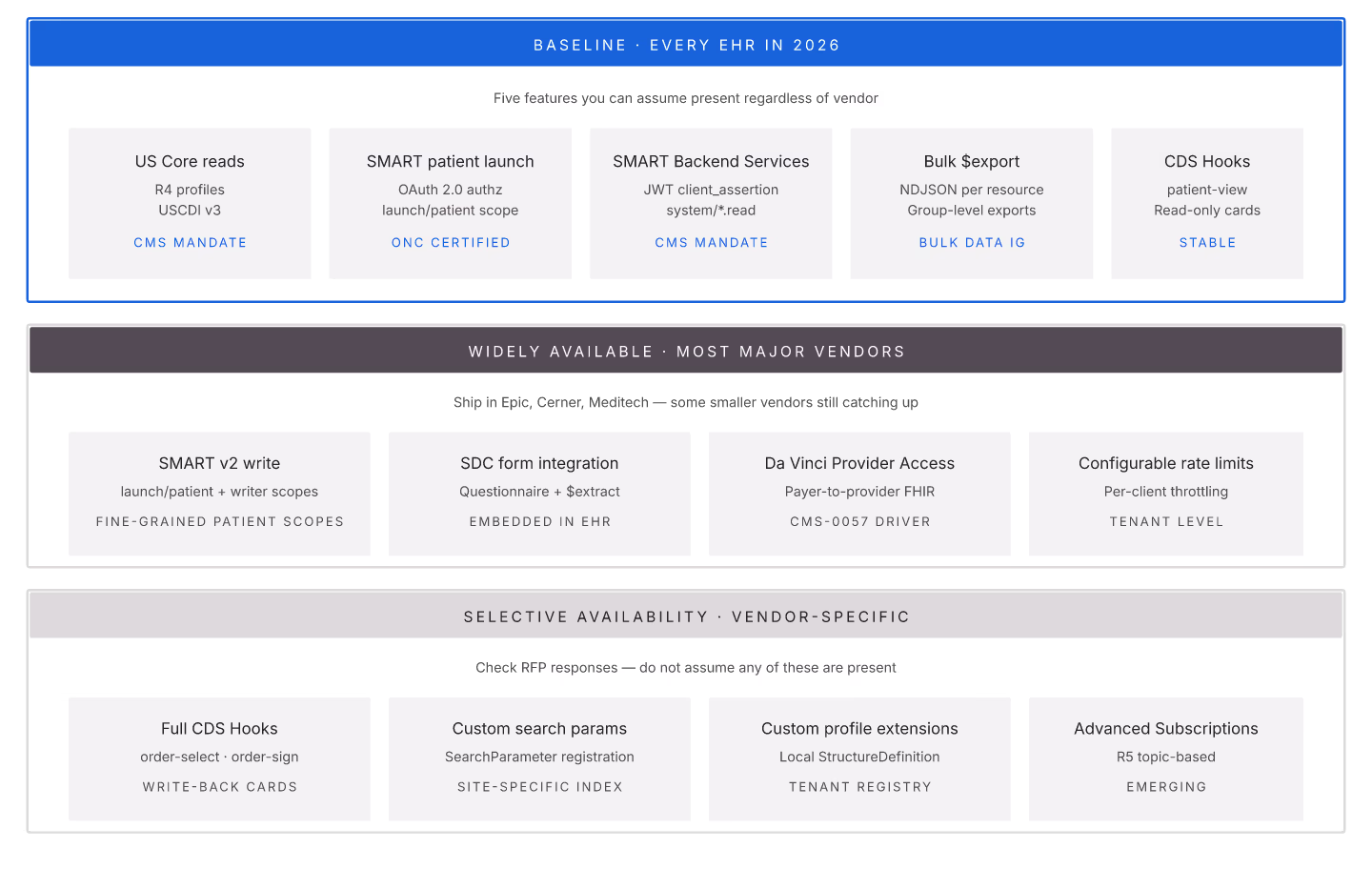
EHR FHIR APIs have consolidated around a common feature baseline in 2026. Buyers evaluating EHRs should expect these features; missing any is a red flag.
Baseline (must-have in 2026)
1. **US Core-conformant reads.** Patient, Encounter, Observation, Condition, MedicationRequest, Practitioner, and secondary US Core resources.
2. **SMART on FHIR patient launch.** Third-party app integration standard.
3. SMART Backend Services. System-to-system integrations.
4. **Bulk Data IG $export.** Nightly bulk data for analytics.
5. **CDS Hooks patient-view.** Point-of-care decision support.
Widely available
1. Write access via SMART v2 scopes. 2. SDC-based form integration. 3. Da Vinci Provider Access API. 4. Configurable rate limits per app.
Selective availability
1. Full CDS Hooks (order-select, order-sign). 2. Custom search parameters. 3. Custom profile extensions. 4. Advanced Subscription semantics.
Vendor baseline scorecard
| EHR | US Core reads | SMART launch | Bulk export | CDS Hooks | Write |
|---|---|---|---|---|---|
| Epic | Full | Full | Full | Full | Configurable |
| Cerner Powerchart | Full | Full | Full | Full | Configurable |
| Athenaclinicals | Full | Full | Full | Partial | Custom |
| Meditech | Growing | Full | Partial | Partial | Custom |
Rate limits (typical)
| Scope | Range |
|---|---|
| patient/* | 30-100 req/min |
| user/* | 60-200 req/min |
| system/* | 500-5000 req/min |
| Bulk export | 1-3 concurrent |
Purchasing red flags
1. Missing US Core conformance (verify with Inferno). 2. Custom auth instead of SMART. 3. No bulk export. 4. Aggressive rate limits without justification. 5. Custom profile requirements for third-party apps.
EHR FHIR APIs in 2026 have a well-understood baseline. Buyers should hold vendors to it.

FHIR Schema: Practical Notes on the Resource Structure
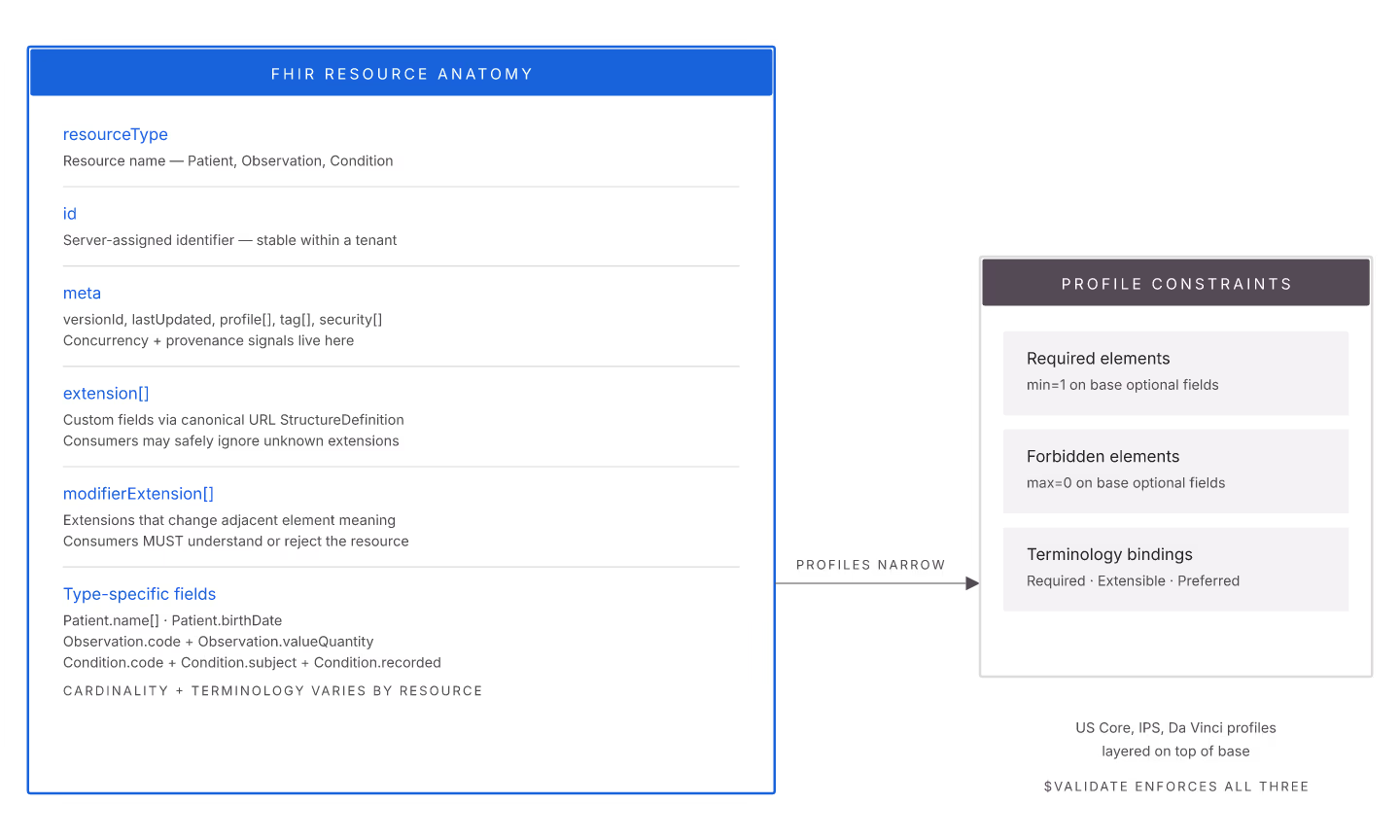
The FHIR schema — the underlying structure of resources — is well-documented but has practical patterns worth internalizing. Understanding schema mechanics prevents integration surprises.
Resource anatomy
Every resource has:
1. resourceType — the resource name. 2. id — server-assigned identifier. 3. meta — versionId, lastUpdated, profile references, tags, security labels. 4. extension[] — custom fields. 5. modifierExtension[] — extensions that change the meaning of adjacent elements. 6. Type-specific fields — Patient has name, gender; Observation has code, value.
Data types
FHIR defines primitive types (string, integer, dateTime), complex types (HumanName, Address, Quantity), and reference types (Reference to another resource).
Extension mechanism
Extensions add fields without changing base spec. Each extension has:
- url — canonical URL identifying the extension StructureDefinition. - value[x] — the extension value. - Optional nested extension[] for complex extensions.
Profile constraints
Profiles narrow the base schema:
1. Required elements. Cardinality bumped to 1..1 or 1..*. 2. Forbidden elements. Cardinality set to 0..0. 3. Terminology bindings. Coded fields bound to specific ValueSets. 4. Fixed values. Elements set to specific values. 5. Slicing. Repeating elements categorized by discriminator.
Common schema mistakes
1. Custom extensions without StructureDefinition. Non-conformant, downstream can't validate. 2. Wrong data type. `$validate` catches this. 3. Missing required elements per profile. Non-conformant. 4. Reference type mismatch. Reference to wrong target resource type.
Tools for schema exploration
1. HL7 FHIR spec — reference documentation. 2. US Core spec — US-specific profiles. 3. Server-provided CapabilityStatement — what your server actually supports. 4. Inferno for validating against profiles.
Extension governance
Organizations creating custom extensions should:
1. Publish StructureDefinitions. 2. Version-control extension changes. 3. Include validation in write path. 4. Document extension purpose and semantics.
FHIR schema is well-designed for extensibility while maintaining conformance. Get the extension governance right and future extensions add cleanly.